How to add a scrollbar to a table in html


Published on May 14, 2017
Published on Wealthy Affiliate — a platform for building real online businesses with modern training and AI.
Adding a scrollbar to a table is useful, if you want to add additional rows to the table that don't fit into the normal screen or when the table would be cut in half on a mobile device such as a smartphone with a smaller screen.
I run into this issue even though my wordpress theme is responsive.
Here is a simple html code that you can add to the html table code which makes your table scrollable:
Before the table you add into the html text field:
<div style="overflow-x: auto;">
Ready to put this into action?
Start your free journey today — no credit card required.
After the table you add:
</div>
This is an example:
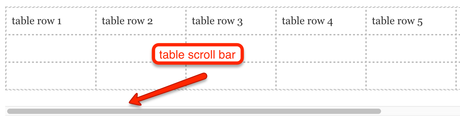
This would be the code for the above table with the scrollbar:
<div style="overflow-x: auto;">
<table style="width: 1000px;">
<tbody>
<tr>
<td style="width: 120px;">table row 1</td>
<td style="width: 120px;">table row 2</td>
<td style="width: 120px;">table row 3</td>
<td style="width: 120px;">table row 4</td>
<td style="width: 120px;">table row 5</td>
<td style="width: 120px;">table row 6</td>
</tr>
<tr>
<td style="width: 120px;"></td>
<td style="width: 120px;"></td>
<td style="width: 120px;"></td>
<td style="width: 120px;"></td>
<td style="width: 120px;"></td>
<td style="width: 120px;"></td>
<td style="width: 120px;"></td>
<td style="width: 120px;"></td>
</tr>
<tr>
<td style="width: 120px;"></td>
<td style="width: 120px;"></td>
<td style="width: 120px;"></td>
<td style="width: 120px;"></td>
<td style="width: 120px;"></td>
<td style="width: 120px;"></td>
<td style="width: 120px;"></td>
<td style="width: 120px;"></td>
</tr>
</tbody>
</table>
</div>
I hope this may help you.
Sibylle
Share this insight
This conversation is happening inside the community.
Join free to continue it.The Internet Changed. Now It Is Time to Build Differently.
If this article resonated, the next step is learning how to apply it. Inside Wealthy Affiliate, we break this down into practical steps you can use to build a real online business.
No credit card. Instant access.