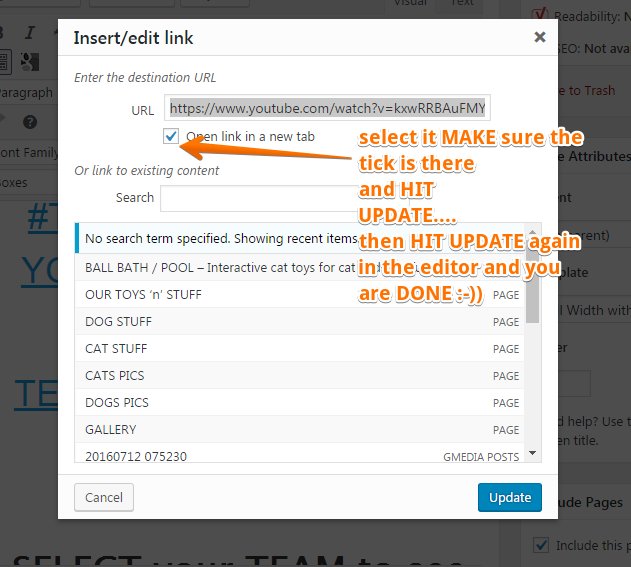
Links - how to set them to open in a new window new tab

17
18
1.9K followers

After my previous BLOG https://my.wealthyaffiliate.com/t1967/blog/links-s...

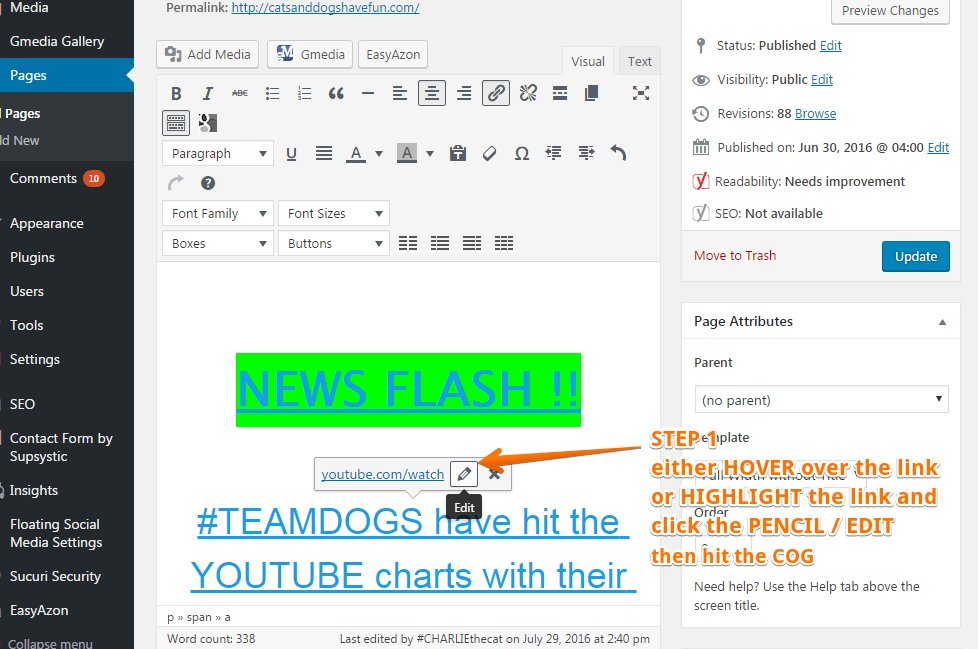
It was suggested i should show how to do it......so ....this is how i do it :-))

STEP ONE

STEP 2

:-))

ANY QUESTIONS, COMMENTS PM ME OR LEAVE ONE BELOW.

HOPE IT HELPS SOMEONE :-))

UPDATE : Compsol99 just said to add this " for HTML in the TEXT tab of your editor so my link now looks like this:-

<a href="https://www.youtube.com/watch?v=kxwRRBAuFMY" >

17
18

Join FREE & Launch Your Business!

Exclusive Bonus - Offer Ends at Midnight Today

00

Hours

:

00

Minutes

:

00

Seconds

2,000 AI Credits Worth $10 USD

Build a Logo + Website That Attracts Customers

400 Credits

Discover Hot Niches with AI Market Research

100 Credits

Create SEO Content That Ranks & Converts

800 Credits

Find Affiliate Offers Up to $500/Sale

10 Credits

Access a Community of 2.9M+ Members

By continuing, you agree to our Terms of Service and Privacy Policy
No credit card required

Recent Comments

18

Oh Yeah! Thanks for this..! Have been adding links, but never realized there was an option button .. have been going back and checking the box to open in a new tab... question... how do I make posts open in a new tab?

1

YOU SHOULD BE ABLE TO DO IT WITH THIS :-)) LET ME KNOW WILL YOU :-)) XOXO TO YOU AND YOURS

1

Thanks. I gotta check this out. :)

1

:-)) XOXO

Thanks Hunny. this is revolutionary.

1

YOU ARE WELCOME HOINEY XOXO

1

Hi Tania,
Thanks, I did not realize that was there. I am going to check my links!

Bruce

1

HOPE IT WORKED FOR YOU HONEY DXOXO

1

Yes it did. Thanks.

1

;-)) XOXO

1

Hey, thanks a bunch! That info is very useful. :)

:-)) GLAD TO HELP

Thanks for your thoughts!!

1

:-))

GREAT INFO THANKS FOR SHARING.

1

:-)) you are welcome honey xoxox thanks for reading xoxo

1

Yes, that's exactly how you should do it! Or, if you know html, you could edit your link in text mode and add the following code at the end of your link (target="_blank"). That will do the same thing. Make sure you press update to save your changes. I'm sure that others will find this very useful. Thanks for sharing.

Shawn

1

Thanks Shawn, it is added as an update to the blog oxoxo to you and yours

See more comments

Join FREE & Launch Your Business!

Exclusive Bonus - Offer Ends at Midnight Today

00

Hours

:

00

Minutes

:

00

Seconds

2,000 AI Credits Worth $10 USD

Build a Logo + Website That Attracts Customers

400 Credits

Discover Hot Niches with AI Market Research

100 Credits

Create SEO Content That Ranks & Converts

800 Credits

Find Affiliate Offers Up to $500/Sale

10 Credits

Access a Community of 2.9M+ Members

By continuing, you agree to our Terms of Service and Privacy Policy
No credit card required

2.9M+

Members

190+

Countries Served

20+

Years Online

50K+

Success Stories

The world's most successful affiliate marketing training platform. Join 2.9M+ entrepreneurs building their online business with expert training, tools, and support.

© 2005-2025 Wealthy Affiliate
All rights reserved worldwide.

🔒 Trusted by Millions Worldwide

Since 2005, Wealthy Affiliate has been the go-to platform for entrepreneurs looking to build successful online businesses. With industry-leading security, 99.9% uptime, and a proven track record of success, you're in safe hands.