AI Image Prompting: Storytelling - Part 2


Published on August 16, 2026
Published on Wealthy Affiliate — a platform for building real online businesses with modern training and AI.


Turning A Story Idea Into an AI Image Prompt
In Part 1, we looked at how a single image can make us wonder what happened before the moment we see — and what might happen next.
Now we’re going to turn that around. Instead of looking at an image and finding its story, we’re going to start with the story and build the image prompt from it.
Start With The Story — Not the Prompt
The point here is to get people away from immediately thinking: What words should I put in my AI prompt? Instead, first ask:
What do I want to happen in this image?
We can keep this very practical. Before writing the prompt, answer four little questions:
- Who is in the story?
- Where are they?
- What is happening right now?
- What should the viewer feel or wonder?
And then we need an example we can carry through the article. For instance, the starting story could be something as simple as:
Story idea: An older man is sitting in his favorite chair looking through a photo book about the dog he loved (Boaz). Beside him is an empty dog bed. He smiles as he remembers their adventures together.
That's not an AI prompt yet.
It's just the story.
Build the Story in Layers
Start with the basic story:
An older man sits in his favorite chair, looking through a photo book about the dog he loved.
Now ask what the AI needs to see in order to tell that story.
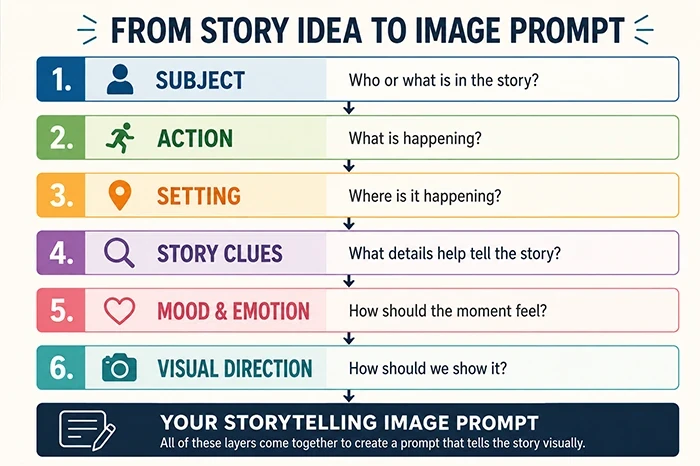
We could build it in layers:
Layer 1 — Subject
Who or what needs to be in the image?
Layer 2 — Action
What is happening at this particular moment?
Layer 3 — Setting
Where is the story taking place, and what objects belong there?
Layer 4 — Story Clues
What small details help the viewer understand more than we're actually telling them?
Layer 5 — Mood and Emotion
How should the scene feel?
Layer 6 — Visual Direction
How should we tell the story visually? Think about composition, camera angle, lighting, and color.
Then, add a short paragraph:
This is where many of the things we’ve already learned in this AI Prompting series begin working together. Composition helps guide the viewer’s eye. Camera angle changes the point of view. Lighting creates atmosphere. Color helps establish emotion.
But none of those choices exist just to make a pretty picture.
They should help tell the story.
Lets Build A Story Prompt
Now we take our simple Boaz story and work through those six layers.
Layer 1 — Subject
An older man and a beloved Giant Schnauzer remembered through photographs in a photo book.
Layer 2 — Action
The man is sitting comfortably in his favorite chair, slowly looking through the photo book.
Layer 3 — Setting
A cozy living room. His chair sits near a side table and reading lamp. The photo book rests open across his lap.
Layer 4 — Story Clues
An empty dog bed remains beside the chair. Perhaps a leash hangs nearby. The open book shows photographs suggesting years of adventures together.
Layer 5 — Mood and Emotion
This isn't really a sad image. It's about love, memories and the quiet happiness that comes from remembering a wonderful companion.
Layer 6 — Visual Direction
Warm late-afternoon window light, soft natural colors, an intimate eye-level camera angle and a composition that keeps the man and photo book as the main focus while allowing the empty dog bed to remain visible.
Show The Story - Don't Explain it
An AI image prompt doesn’t have to explain the entire story to the AI. For example, we could write: An older man whose beloved dog has died sits sadly remembering him.
But what does the AI actually see there? “Beloved,” “died,” and “remembering” are ideas. They aren’t necessarily visible things. Instead, we can give the AI visual clues:
An older man sits in his favorite chair with an open photo book across his lap. The pages contain photographs of adventures with his Giant Schnauzer. An empty dog bed rests beside the chair, and the dog’s leash still hangs from a hook nearby. The man looks down at the photographs with a gentle smile.
Now we have things the AI can actually show us. And the viewer can discover the story.
That’s visual storytelling.
Turn The Story Into the Prompt
Now we can combine our six layers into one image prompt. Notice that we don’t have to put the layers into the prompt as a list. We’ve already done the thinking. Now we can write naturally and describe the scene we want the AI to create.
Our Storytelling Prompt:
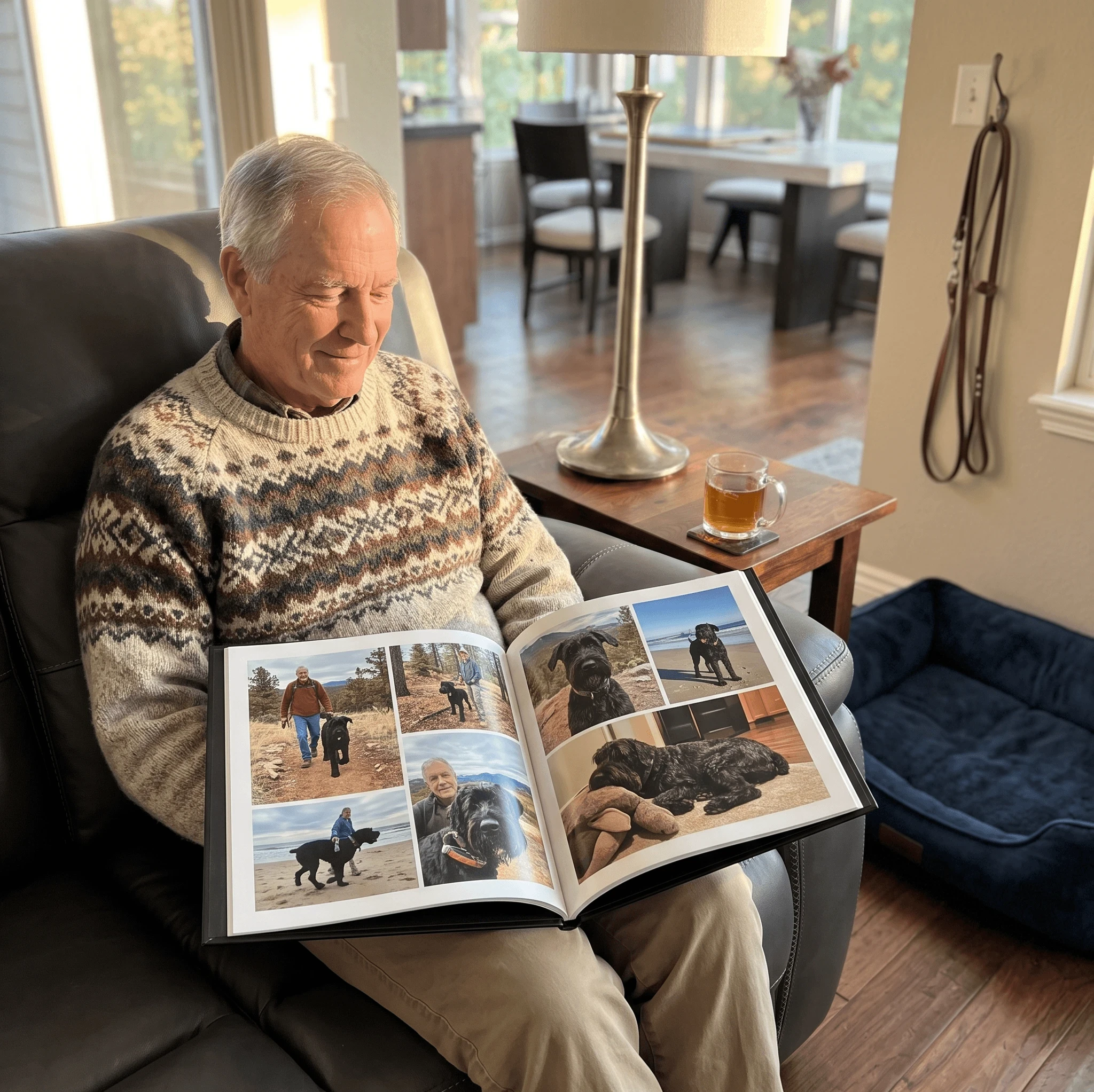
Create a realistic, warm lifestyle photograph of an older man sitting comfortably in his favorite chair in a cozy living room, looking down at an open photo book resting across his lap. The pages show photographs of happy adventures with his Giant Schnauzer. An empty dog bed sits beside his chair, and the dog’s leash hangs nearby. The man has a gentle smile as he looks through the photographs. Warm late-afternoon window light fills the room, with soft natural colors and subtle shadows. Use an intimate eye-level camera angle and a balanced composition that keeps the man and photo book as the main focal point while leaving the empty dog bed clearly visible. The mood is loving, peaceful and nostalgic rather than sad. Photorealistic, natural and emotionally authentic.
That is a much longer prompt than our original story idea — but notice what happened.
Every added detail has a job.
Ready to put this into action?
Start your free journey today — no credit card required.
The chair and living room establish the setting.
The photo book gives him something to do.
The photographs, empty dog bed and leash provide the story clues.
His expression, lighting and color establish the emotion.
The camera angle and composition determine how we experience the moment.
We didn’t just add more words. We built a story the AI can see.
Look At What The AI Gave Us
We created the image using our storytelling prompt. Now, before changing anything, let’s look at what the AI actually gave us.
Don’t just ask, “Do I like this image?”
“Does this image tell the story I intended?”
Does The Prompt Need Refining?
Not every first AI image needs to be changed.
Sometimes we get so accustomed to refining prompts that we start looking for something to fix simply because we can. Instead, go back to the original goal.
Did the image tell the story?
In this case, I think it did. The photo book became the focal point. The empty dog bed and hanging leash became quiet storytelling clues. The man’s expression and the warm light created the nostalgic feeling we wanted.
Could we change things? Of course. We could move the dog bed, change the camera angle, make the room more rustic, alter the lighting or add more details.
But would those changes make the story better? That is the question that matters.
Refine with a purpose — not just because you can.
Storytelling Can Have A Purpose
A storytelling image can do more than create emotion. It can show a product in use, demonstrate a problem, suggest a solution, spark curiosity, or help someone imagine themselves having an experience.
For example, instead of showing a photo book sitting on a table, we showed someone experiencing the memories inside the book. Instead of showing a cup of tea by itself, we could show someone settling into a quiet morning tea ritual.
Instead of showing hiking gear arranged neatly on the ground, we could show a hiker stopping beside a trail as a storm begins moving over the mountains.
The product or subject is still there.
But now something is happening.
Simple Story Formulas You Can Use
You don’t have to invent a complicated story every time you create an image.
Sometimes all you need is a simple situation that gives the viewer something to notice, feel, or wonder about.
Try starting with one of these:
- Someone + Action + Reason
A woman packs a picnic basket because she is preparing for an afternoon beside the lake. - Problem + Moment + Possible Solution
A hiker studies a darkening sky while reaching into his backpack for rain gear. - Product + Person + Experience
A woman curls up in her favorite chair with a steaming cup of herbal tea and a book on a rainy afternoon. - Before + Present Moment + Hint of What Comes Next
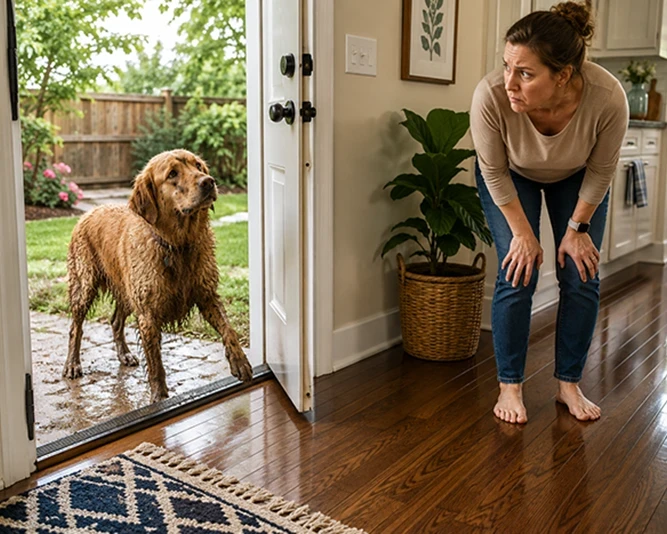
A muddy dog stands beside an open back door while his owner looks at the freshly cleaned floor.
 The Prompt:
Create a bright, photorealistic scene of a muddy golden retriever standing just outside an open back door, hesitating at the threshold with one paw lifted. Inside, his owner leans forward watching him with a worried expression as she looks at her freshly cleaned, polished hardwood floor. The dog looks muddy, wet, and slightly guilty. Show the contrast between the muddy outdoor area and the spotless indoor floor. Warm natural daylight, realistic home interior, eye-level camera angle, candid storytelling photography.
That last one gives us a little humor.
None of these needs an elaborate plot.
We simply created a moment.
From there, ask our six questions again:
- Who?
- What are they doing?
- Where are they?
- What clues tell the story?
- How should it feel?
- How should we visually show it?
That little moment can become your image prompt.
Using Storytelling Images In Your Business
If you create images for a blog, website, social media, or affiliate marketing, storytelling can help you move beyond simply illustrating what your content is about. Instead, you can show your reader a moment they recognize or can imagine themselves experiencing.
- A tea blogger could show someone enjoying a quiet morning tea ritual rather than simply showing a cup of tea.
- A travel blogger could show a tired hiker reaching a scenic overlook just as the sun breaks through the clouds.
- A gardening site could show a gardener discovering the first tomato of the season.
- An affiliate marketer could show a product solving the problem it was designed to solve rather than simply displaying the product.
The image still supports the content. But now it can also create curiosity, emotion, recognition, or desire. You aren’t just showing the reader something.
 The Prompt
A cozy morning tea ritual. A woman sits comfortably curled in a favorite armchair beside a large window, holding a steaming cup of herbal tea in both hands. An open book rests nearby on a small side table. Soft morning light enters through the window while gentle rain falls outside. Her expression is peaceful and content, enjoying a quiet moment before beginning her day. Warm natural colors, intimate eye-level composition, soft realistic lighting, photorealistic lifestyle photography, peaceful and inviting atmosphere. 4:3 orientation
Notice that the tea is still part of the image, but it isn’t really the story.
The quiet moment is the story. We didn’t create an image of tea. We created an image of someone experiencing tea.
You’re inviting them into a moment.
Try It Yourself - Start With a Moment
Before you write your next AI image prompt, don’t start by thinking about camera settings, art styles, or descriptive words. Start with a moment. Think about an image you need for your blog, business, social media, or simply for fun. Then write one sentence describing what is happening.
For example:
A gardener steps outside early in the morning and discovers that the first sunflower of the summer has opened.
A story doesn’t have to be dramatic. Something simply has to be happening.
Don’t write the prompt yet.
Run that little story through our six layers:
- Who is there?
- What are they doing?
- Where are they?
- What visual clues help tell the story?
- How should the moment feel?
- How should you visually show it?
Then turn those answers into your prompt and generate the image.
Finally, look at your result and ask: Does the image tell my story without the prompt?
If it does, you’ve done more than create a nice AI image.
You’ve created a visual story.
Bringing It All Together
In Part 1, we started with an image and looked for the story hidden inside it.
In Part 2, we reversed the process.
We started with a simple story idea, broke it into visual layers, turned those layers into a prompt, generated an image, and then asked whether the image actually told the story we intended.
That’s the part I hope you remember: Start with the story.
You can always add lighting, color, camera angles, composition, atmosphere, art styles, and all the other wonderful tools available to us.
But first decide what is happening.
Give your viewer something to notice. Something to feel. Maybe even something that makes them wonder what happened five minutes before — or what will happen five minutes later.
Because sometimes the difference between an AI image that is simply beautiful and one that makes us stop and look is very small.
One has a subject.
The other has a story.
Next up will be "AI Image Prompting - Depth of Field & Focus". Why Doesn't My Subject Stand Out? Have you ever created an AI image that contained almost everything you asked for, but somehow it still didn't look quite right? I'll be addressing this in the next post.
-Shirley
TIP
Many of the images and examples you’ll see throughout the series are created using Kre8or.ai, the AI image creation tool available here at Wealthy Affiliate. If you’d like to experiment with your own AI images, you can try Kre8or here:
And if you found this series from Facebook, Pinterest, or somewhere else on the web and would like to learn more about building websites, affiliate marketing, content creation, and using AI as part of an online business, you can learn more about Wealthy Affiliate here:
Disclosure: This is a referral/affiliate link. I may receive a benefit or commission if you join through one of my links, at no additional cost to you.
Share this insight
This conversation is happening inside the community.
Join free to continue it.The Internet Changed. Now It Is Time to Build Differently.
If this article resonated, the next step is learning how to apply it. Inside Wealthy Affiliate, we break this down into practical steps you can use to build a real online business.
No credit card. Instant access.