AI Image Prompting - Depth of Field & Focus


Published on August 22, 2026
Published on Wealthy Affiliate — a platform for building real online businesses with modern training and AI.


Why Doesn't My Subject Stand Out?
Have you ever created an AI image that contained almost everything you asked for, but somehow it still didn't look quite right?
The subject is there. The colors are good. The setting looks fine. Maybe you even got the lighting you wanted. But when you look at the finished image, your eye doesn't immediately know where to go.
The person, animal, flower, or object you intended to be the star of the image seems to be competing with everything around it.
The problem may be focus.
Photographers have been using focus to guide a viewer's eye for generations. By deciding what should be sharp and what should be soft or blurred, a photographer can quietly tell you, Look here. This is important.
We can use that same idea when creating AI images.
One of the most useful tools for doing that is called depth of field. It sounds like another technical photography term—and it is—but you don't need to understand cameras, lenses, apertures, or f-stops to use it in an AI prompt.
You only need to understand what depth of field does to an image and learn a few simple words that help tell the AI what you want.
In this part of the AI Image Prompting series, we'll look at shallow and deep depth of field, selective focus, foreground blur, and one of my favorite photography words: bokeh.
More importantly, we'll see how changing the focus can change where you look—and sometimes change the entire feeling of an image.
What Is Depth of Field?
Depth of field simply describes how much of an image appears sharp from front to back.
With a shallow depth of field, only a relatively small part of the scene is in sharp focus. The subject may be crisp and detailed while the background becomes soft and blurred. This helps separate the subject from its surroundings and guides your eye.
With a deep depth of field, much more of the scene remains sharp. The foreground, subject, and background may all contain clear detail. This can be useful when the setting matters as much as the main subject.
Neither one is automatically better. The question is: What do you want the viewer to notice?
Let's see what happens when we give AI the same bluebird and spring garden but change the instructions about focus.
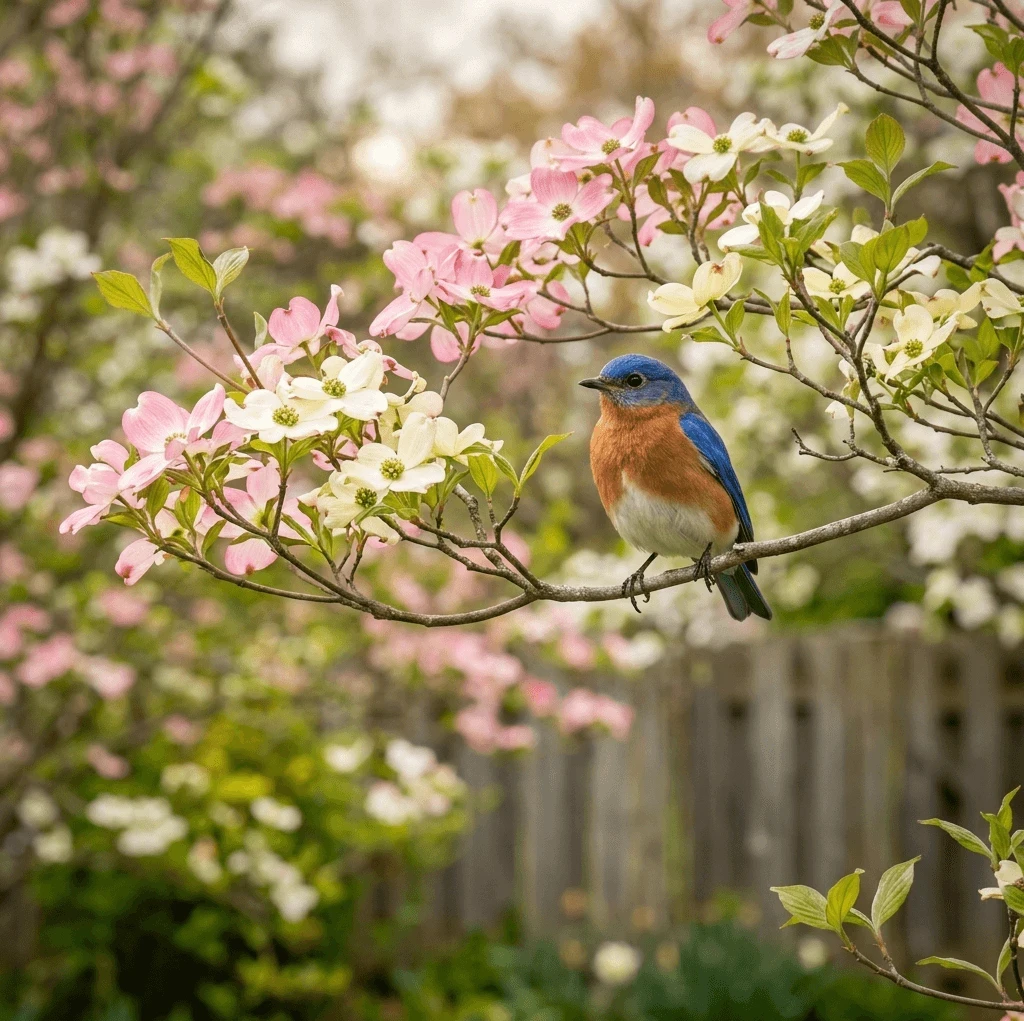
Our Base Prompt
An Eastern bluebird perched on a flowering dogwood branch in a spring garden, pink and white blossoms, fresh green foliage, natural morning light, realistic wildlife photography.
For our first image, we'll ask AI to keep the entire scene relatively sharp.
Deep Depth of Field
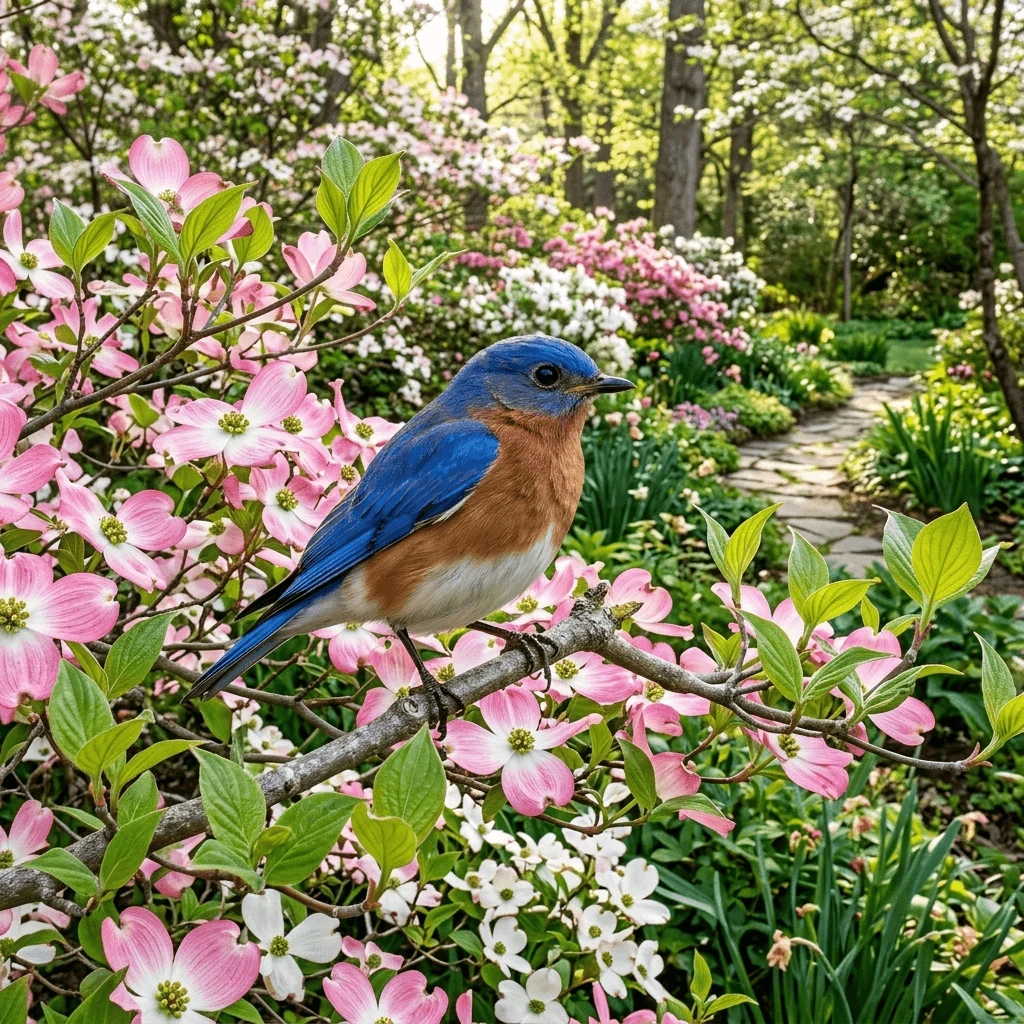
Prompt
An Eastern bluebird perched on a flowering dogwood branch in a spring garden, pink and white blossoms, fresh green foliage, natural morning light, realistic wildlife photography, deep depth of field, bluebird, flowering branches, and distant garden all rendered in sharp detail.
Next, we'll change only the focus instructions.
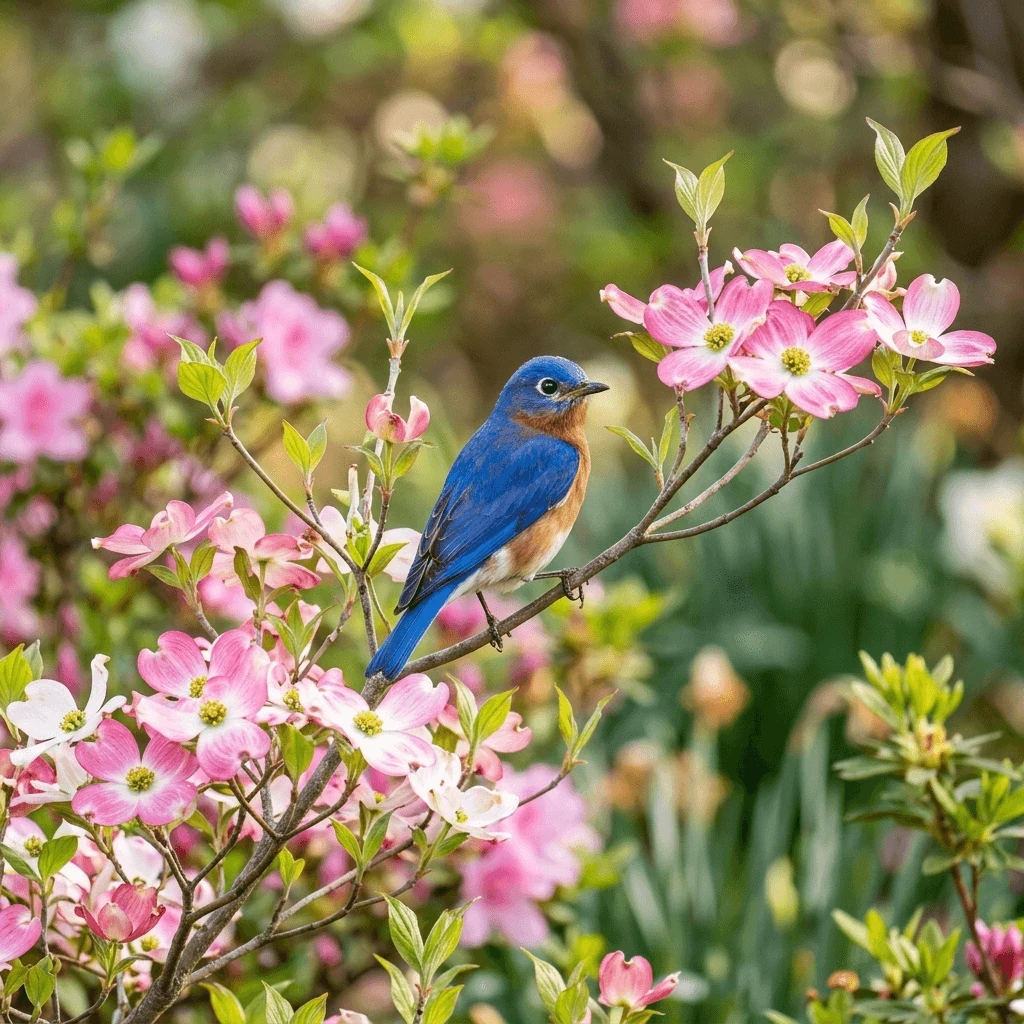
Shallow Depth of Field
Prompt
An Eastern bluebird perched on a flowering dogwood branch in a spring garden, pink and white blossoms, fresh green foliage, natural morning light, realistic wildlife photography, shallow depth of field, bluebird and nearby blossoms in sharp focus, distant garden softly blurred.
When you compare the two images, don't just ask which one you like better.
Ask yourself:
Where did your eye go first?
That's what we're learning to control. Shallow Depth of Field
Make the Subject the Star
Sometimes you don't want the viewer exploring every corner of an image. You want one person, animal, flower, or object to command attention immediately. That's where shallow depth of field can be especially useful.
With shallow depth of field, the main subject remains sharp while areas in front of or behind it become progressively softer. Instead of competing with the subject, the surroundings become supporting players.
Look back at our bluebird examples. In the deep depth-of-field image, the garden path, flowers, trees, and bird all contain considerable detail. Your eye has plenty of places to explore.
In the shallow depth-of-field version, the garden is still there. We know our bluebird is surrounded by flowers and greenery, but we don't need to study every leaf and blossom. The softer background helps the bird separate visually from its surroundings.
In other words, the background still provides context without demanding attention.
When Is Shallow Depth of Field Useful?
It can work particularly well with:
· Portraits — keeping attention on the person's face and expression.
· Wildlife and birds — separating the animal from a complicated natural background.
· Flowers and small details — allowing one blossom or detail to become the focal point.
· Food images — emphasizing the featured dish while keeping the table setting soft.
· Product images — directing attention toward the item being featured.
· Quiet or emotional scenes — isolating a subject can make an image feel more intimate.
Prompt Words to Try
You don't necessarily need camera settings or technical photography language. Start with simple instructions such as:
· shallow depth of field
· subject in sharp focus
· softly blurred background
· soft background separation
· selective focus
· creamy background blur
You can also be more specific about exactly what should remain sharp:
Eastern bluebird and nearby dogwood blossoms in sharp focus, distant spring garden softly blurred.
That gives the AI two pieces of information: what matters and what doesn't need to compete with it.
Sometimes that's all it takes to turn an image with a subject into an image where the subject becomes the star.
What Is Bokeh?
If you've admired a photograph with a sharply focused subject surrounded by soft, glowing circles of light, you've probably admired bokeh—even if you didn't know there was a name for it.
Bokeh is closely related to shallow depth of field, but it isn't simply another word for a blurred background.
A shallow depth of field determines how much of the scene is in focus. Bokeh describes the appearance and quality of out-of-focus areas, especially blurred points of light.
Those soft circles may come from sunlight filtering through leaves, distant lamps, holiday lights, reflections on water, or other small background highlights. Instead of showing those light sources in sharp detail, they become soft shapes that can add atmosphere without competing with the subject.
Bokeh can be especially effective in:
· Portraits
· Flowers and nature images
· Wildlife photography
· Romantic or dreamy scenes
· Holiday images
· Evening scenes with distant lights
· Images with sunlight filtering through foliage
Prompt Words to Try
Try adding phrases such as:
· soft bokeh background
· creamy bokeh
· warm glowing bokeh
· dreamy bokeh background
· soft circular highlights in the background
· sunlight filtering through leaves creating bokeh
· distant points of light softly blurred
Like depth of field, it helps tell AI what should remain sharp and what should soften.
For example:
Prompt
An Eastern bluebird perched on a flowering dogwood branch, bluebird and nearby blossoms in sharp focus, shallow depth of field, distant spring garden softly blurred, warm sunlight filtering through foliage creating soft circular bokeh highlights.
Notice that we're not replacing our original scene. We're telling AI more precisely how we want the out-of-focus part of that scene to look.
Background blur can remove distractions. Bokeh can turn those distractions into part of the beauty.
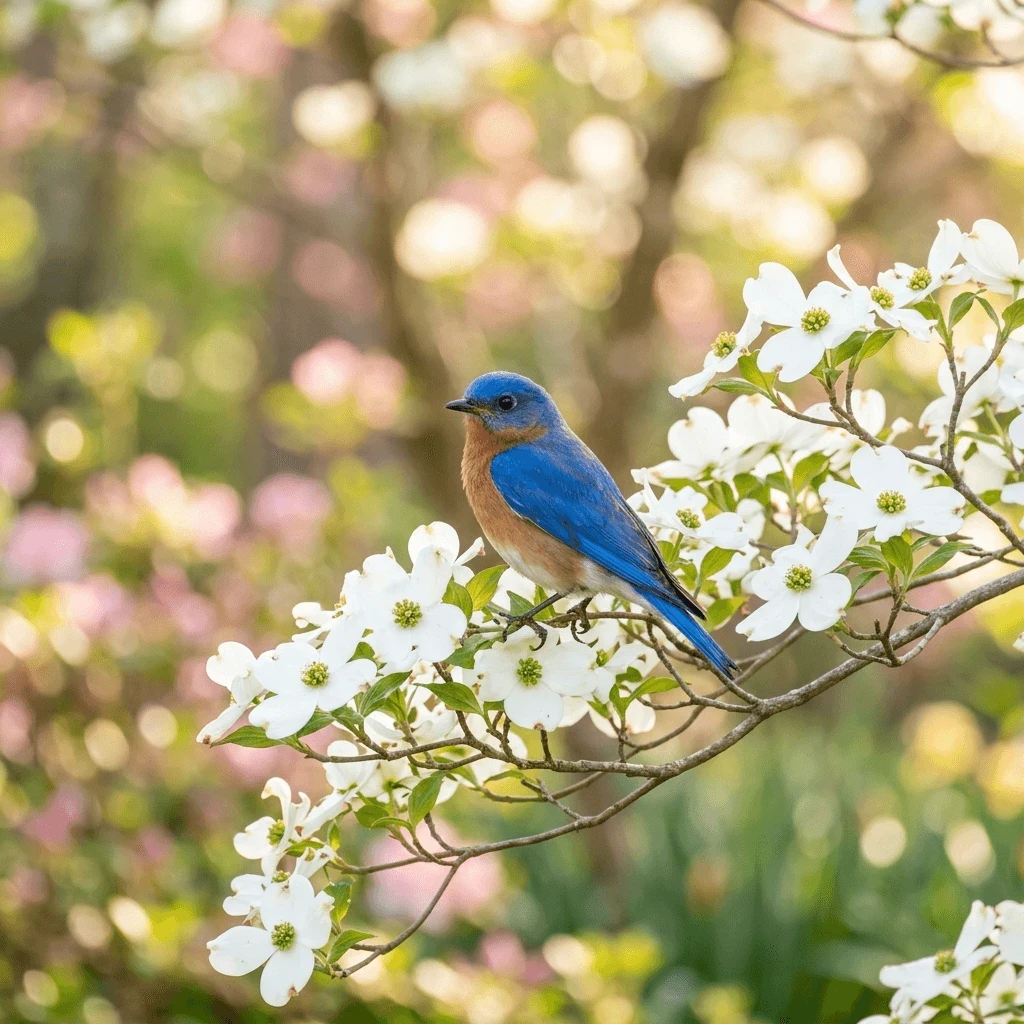
In this version, notice the soft circles of light scattered throughout the background. The garden hasn't simply become blurry. Those out-of-focus highlights have become visual elements of their own, adding warmth and atmosphere while the bluebird and nearby blossoms remain the center of attention.
Foreground Blur — Put the Viewer Inside the Scene.
So far, we've mostly talked about keeping the subject sharp while letting the background soften. But you can also use focus to create depth.
We can blur something in the foreground.
Imagine photographing a bluebird through a flowering branch. A few blossoms are very close to the camera and appear soft and out of focus. The bluebird, sitting a little farther away, is sharp. Behind the bird, the distant garden may become soft again.
Suddenly the image has layers:
soft foreground → sharp subject → soft background
Instead of feeling as though we're simply looking at a picture of a bird, we may feel as though we're standing in the garden, peeking through the blossoms to watch it.
Ready to put this into action?
Start your free journey today — no credit card required.
Foreground blur can be especially useful for:
· Wildlife viewed through leaves, grasses, or flowers
· Portraits photographed through nearby foliage
· A person seen beyond a softly blurred object
· Flowers or grasses in front of a landscape
· Indoor scenes with an out-of-focus object close to the viewer
· Storytelling images where you want to create a sense of observing the scene
Prompt Words to Try
Try phrases such as:
· softly blurred foreground
· out-of-focus flowers in the foreground
· foreground blur creating depth
· subject sharply focused beyond the foreground
· soft foreground framing the subject
· layered depth with blurred foreground and background
The important thing is to tell AI where each layer belongs.
Prompt
An Eastern bluebird perched on a flowering dogwood branch in a spring garden, bluebird in sharp focus, soft out-of-focus dogwood blossoms very close to the camera in the foreground, distant garden softly blurred, natural morning light, realistic wildlife photography, layered depth.
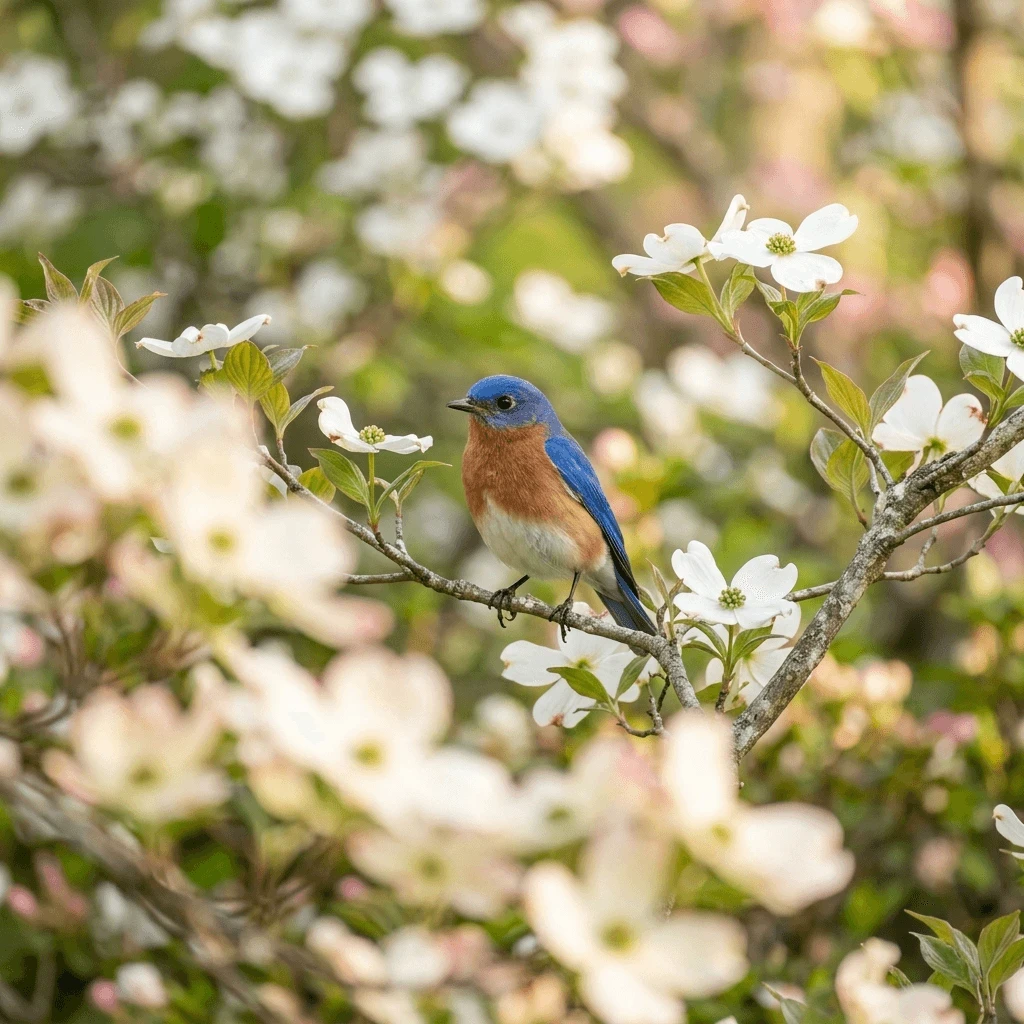
Notice the blurred blossoms between us and the bluebird. They aren't mistakes or unwanted distractions. They're intentionally out of focus, creating a foreground layer before our eye reaches the sharply focused bird. The softer garden behind it creates another layer. Together, those layers give the image a stronger sense of depth.
We're still using blur to direct attention toward our bluebird, but now we are doing something more.
We're using focus to create the feeling that there is space between us and the bird.
That little bit of foreground blur can help turn a flat image into a scene we feel we could almost step into.
Selective Focus — Tell AI Exactly What Matters
Shallow depth of field helps separate a subject from its surroundings. But sometimes we want to be even more specific.
· We don't just want to tell AI, "Keep the subject sharp."
· We want to tell it exactly which part of the subject matters most.
That's where selective focus becomes useful.
Imagine a woman sitting near a window holding an antique teacup. There are several things in that scene that could attract our attention: her face, her hands, the teacup, the window, or objects in the room around her.
If we tell AI to place selective focus on the teacup and her hands, we're making a storytelling decision. The woman is still important, but for that moment the teacup becomes the visual center of the story.
Change the selective focus to the woman's eyes, and the same basic scene can tell a different story.
Where Can Selective Focus Help?
Selective focus can be useful when you want to emphasize:
· A person's eyes or expression
· Hands holding an important object
· A flower among many flowers
· One bird or animal within a group
· A piece of jewelry or another small detail
· A photograph, letter, book, or keepsake
· Steam rising from a cup
· An object that provides an important clue to the story
Prompt Words to Try
Try phrases such as:
· selective focus on...
· sharp focus on...
· focus attention on...
· eyes in sharp focus
· hands and teacup sharply focused
· surrounding elements softly out of focus
· face slightly softened while the object remains sharp
The more specific you are, the less AI has to guess about what deserves attention.
For example:
Prompt
An older woman sitting beside a softly lit window holding an antique floral teacup in both hands, selective focus on the teacup and her hands, teacup pattern rendered in crisp detail, woman's face slightly out of focus, background room softly blurred, warm natural window light, realistic photography.
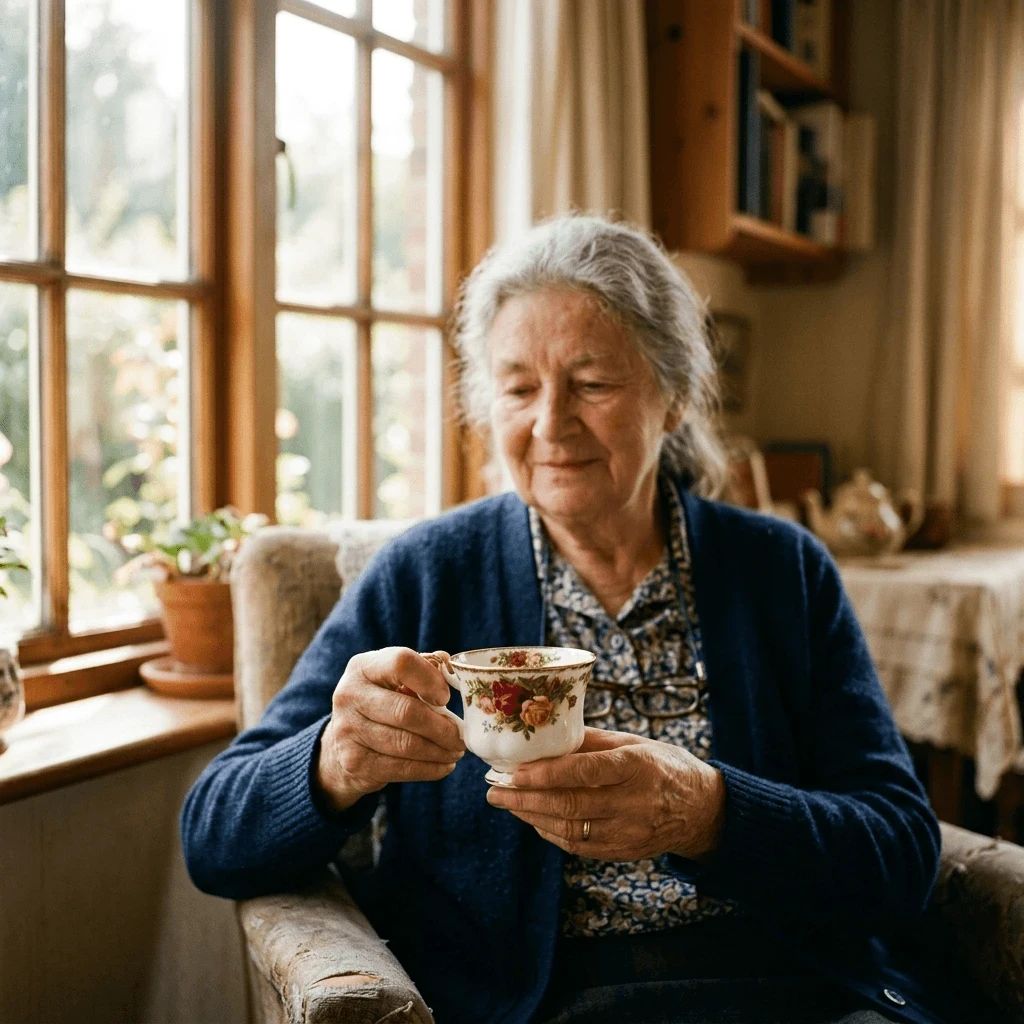
Now we can change just the focus instruction:
Prompt
An older woman sitting beside a softly lit window holding an antique floral teacup in both hands, selective focus on the woman's eyes and expression, eyes rendered in crisp detail, teacup and hands slightly softened, background room softly blurred, warm natural window light, realistic photography.
The woman, teacup, setting, and lighting haven't fundamentally changed.
What changed is what we're asking the viewer to notice first.
Prompt Attempt 1
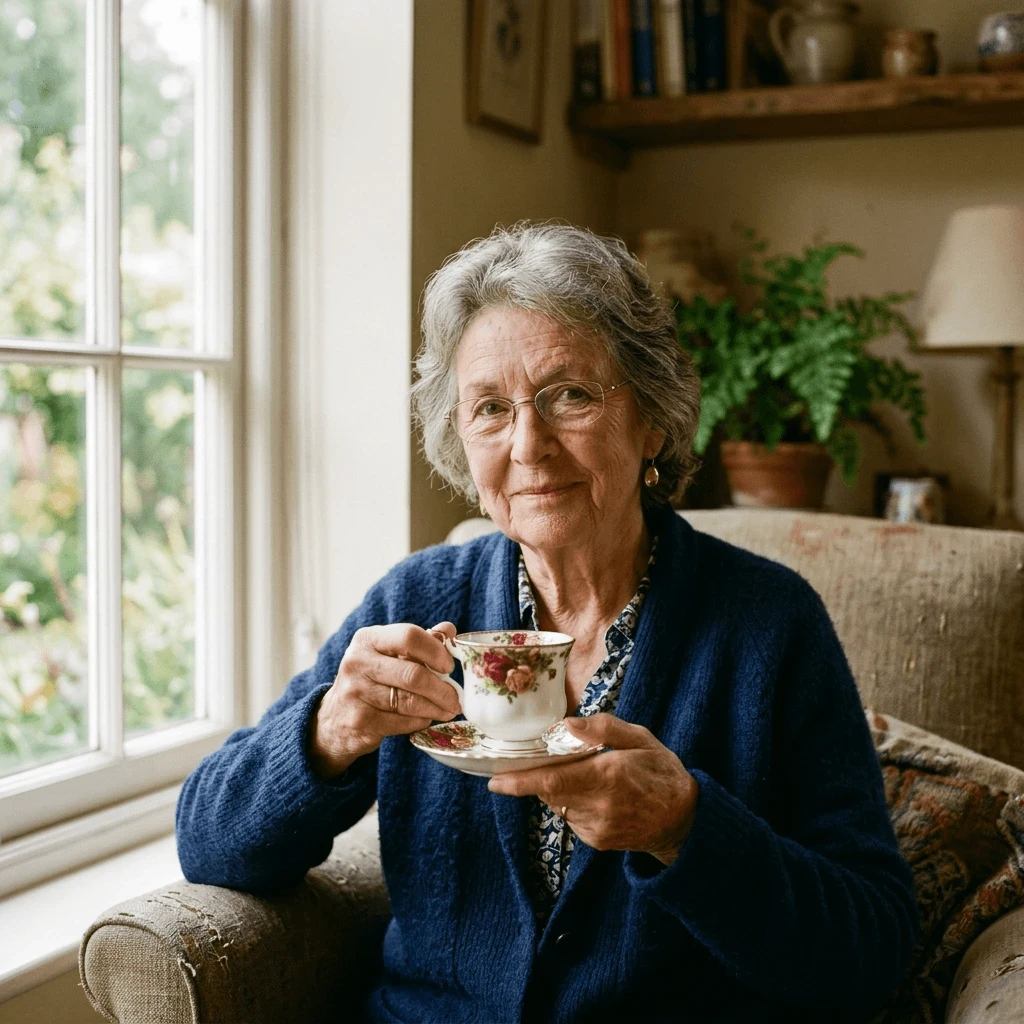
"selective focus on the teacup and hands", but AI still kept her face quite sharp.
Our first attempt didn't quite work. Although the teacup is detailed, the woman's face and eyes are also quite sharp. In fact, her direct gaze may attract our attention before the cup does. AI understood part of the instruction, but it didn't create the strong selective focus we wanted. Now let's refine the prompt
Prompt Attempt 2
Close-up photograph of an older woman holding an antique floral teacup toward the camera. The teacup and her hands are the ONLY elements in sharp focus. Crisp intricate detail on the floral pattern, rim, handle, fingers and hands. The woman's face is noticeably soft and out of focus behind the cup. Her eyes and facial features are deliberately blurred. Very shallow depth of field, background completely soft and blurred, warm natural window light, realistic photography. Focus point: antique teacup.
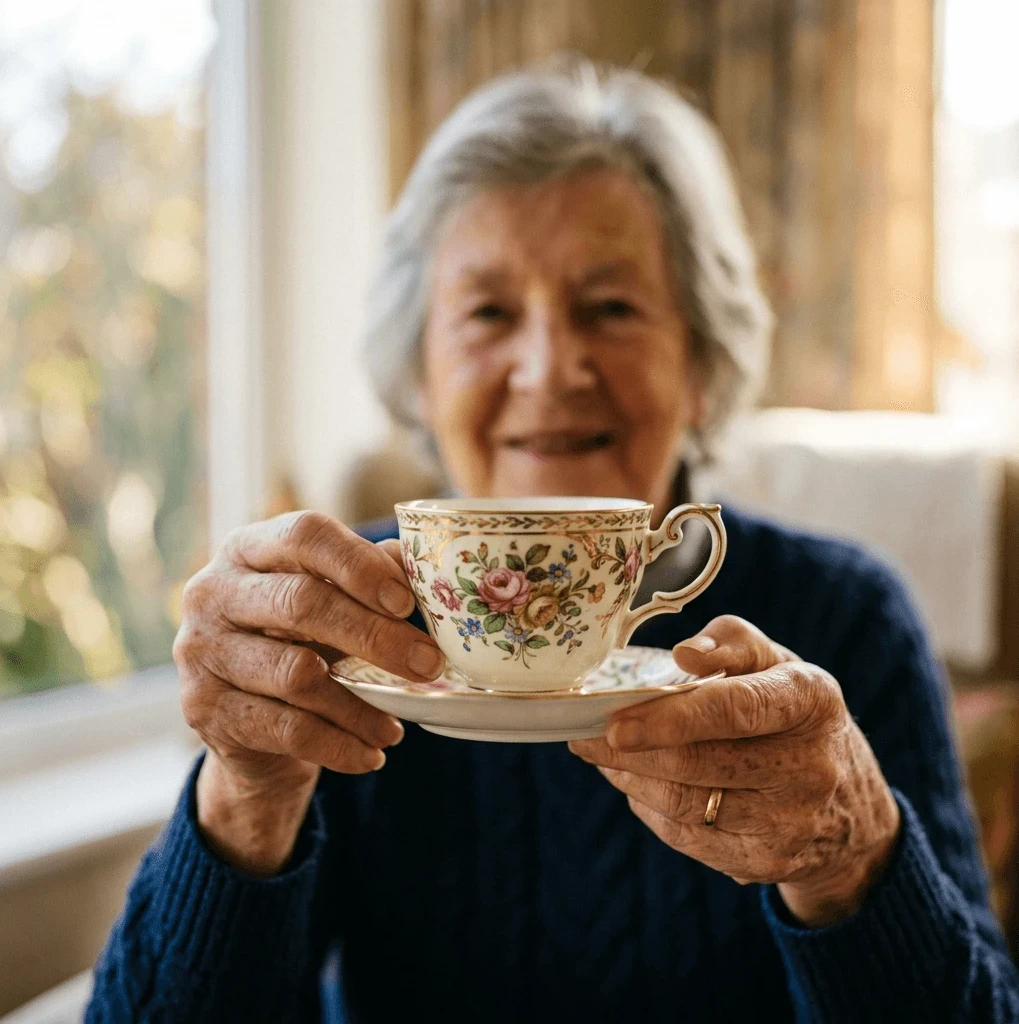
Instead of starting over with a completely different idea, let's make our instructions more specific. We'll tell AI exactly what should be sharp, what should be blurred, and where the main focus point should be. Notice what we've done.
We didn't merely say selective focus on the teacup. We've now told it:
· WHAT is sharp: cup + hands
· WHAT is not: face + eyes + room
· HOW MUCH: noticeably soft
· WHERE the focus point is: teacup
And I deliberately added "holding the teacup toward the camera." That creates more physical distance between the cup and her face, which should make the requested focus separation easier for the generator to represent.
This is actually our first little taste of the future Prompt Refinement article: when AI doesn't listen, don't necessarily throw everything away—figure out which instruction wasn't strong enough.
Let's see whether Kre8or gets the message this time
Yes! THAT worked. 😄☕
Now our eyes go straight to the teacup and hands. The floral pattern, gold trim, handle, fingers, wrinkles—beautifully crisp. Meanwhile her face is unmistakably present, and we can even see her expression, but it's clearly outside the focal plane.
That's one of the most useful things focus can do in an AI image. It doesn't simply make part of the picture blurry.
Focus Language Worth Remembering
Useful Prompt Language
· focus on...
· sharp focus on...
· selective focus on...
· background softly out of focus
· surrounding elements slightly blurred
Key idea: Don't just tell AI what is in the image. Tell it what deserves attention.
A Little Camera Language Can Help — But You Don't Need to Be a Photographer
Photographers control depth of field with aperture, lens choice, distance from the subject, and several other factors. Those details matter when you're working with a camera, but you don't have to understand all of them to use the visual ideas in an AI image prompt.
Sometimes a little camera language can help the image generator understand the look you're after. You might try terms such as:
· macro photography
· portrait photography
· telephoto look
· wide-angle landscape
Think of these as descriptive clues rather than rules. If simple focus language gives you the result you want, don't make the prompt more technical than it needs to be.
The most useful instruction is still the simplest one: tell AI what should be sharp, what should be soft, and where you want the viewer to look.
Same Scene — Different Focus
Throughout this article, we've kept returning to essentially the same idea: change the focus instructions, and you can change the way the viewer experiences the image.
With our bluebird in the spring garden, we saw several possibilities:
· Deep depth of field kept the bird, flowers, and garden relatively sharp, allowing the setting to become an important part of the image.
· Shallow depth of field kept our bluebird sharp while softening the garden, making the bird the obvious subject.
· Bokeh transformed out-of-focus areas into soft circles of light that added atmosphere as well as separation.
· Foreground blur placed soft blossoms between us and the bird, adding layers and creating a stronger feeling of depth.
We didn't have to completely reinvent the scene each time. Much of the change came from telling AI what should be sharp, what should be soft, and where we wanted the viewer to look.
That's the real power of focus in an AI image prompt: focus isn't simply about sharpness. It's about attention.
When Blur Doesn't Work
Blur is useful, but AI doesn't always put it where we intended. You may run into problems such as:
· AI blurs part of the subject that should be sharp.
· The blur looks artificial.
· Too much blur removes important storytelling information.
· The wrong object becomes the focal point.
· Everything becomes so soft that the image loses detail.
How to Fix It
Instead of starting over, make the focus instructions more precise. For example:
Bluebird and flowering branch in sharp focus, distant garden softly blurred.
Be specific about:
1. What should be sharp.
2. What should be soft.
3. Where those elements are located.
If AI doesn't respond the way you expected, don't assume you need a completely new prompt. Sometimes a few more precise instructions are enough. We'll explore that idea more deeply when we get to Prompt Refinement later in this series.
Try It Yourself
Choose an AI image you've already created—or create a simple new scene.
Generate several versions using:
· deep depth of field
· shallow depth of field
· bokeh
· foreground blur
· selective focus
Don't change everything else in the prompt. Keep the subject, setting, lighting, and other important details as similar as possible so you can really see what the focus instruction changes.
Then compare the images and ask:
Where does my eye go first?
That's the real purpose of focus.
Final Thought: Focus Is Part of the Story
Depth of field isn't just a photography term. It's another way to communicate.
Lighting can tell the viewer how a scene feels.
Color can influence emotion.
Composition can guide the eye.
Storytelling gives the image meaning.
Focus tells the viewer what matters.
And sometimes adding only a few words to an AI prompt can make the difference between an image that contains a subject and an image that makes us notice it.
Coming Next
AI Image Prompting — Weather & Atmosphere: Change the Weather, Change the Story
-Shirley
TIP
Many of the images and examples you’ll see throughout the series are created using Kre8or.ai, the AI image creation tool available here at Wealthy Affiliate. If you’d like to experiment with your own AI images, you can try Kre8or here:
And if you found this series from Facebook, Pinterest, or somewhere else on the web and would like to learn more about building websites, affiliate marketing, content creation, and using AI as part of an online business, you can learn more about Wealthy Affiliate here:
Disclosure: This is a referral/affiliate link. I may receive a benefit or commission if you join through one of my links, at no additional cost to you.
Share this insight
This conversation is happening inside the community.
Join free to continue it.The Internet Changed. Now It Is Time to Build Differently.
If this article resonated, the next step is learning how to apply it. Inside Wealthy Affiliate, we break this down into practical steps you can use to build a real online business.
No credit card. Instant access.