Tagging your blog posts


Published on January 27, 2014
Published on Wealthy Affiliate — a platform for building real online businesses with modern training and AI.
There seems to have been some confusion of tagging posts lately, I hope to clear this up with my post here.
TAGS
Some people think you are supposed to put member's names in here, others say it should be keywords. Which is right and what are tags really for?
In social media like facebook or twitter, you include other member's names so they will be notified to read the piece you are posting. Lots of information gets included on their wall so they might miss the post you specifically want them to see.
On blogs, that is not what tags are for. This includes your blog here.
On your blog here and elsewhere a tag is a word or short group of words that describe what your post is about. All posts with the same tag word/s will be grouped together, so if I read your blog about choosing a niche and I want to read what everyone else wrote about choosing a niche, I click on the tag for that and all posts with that same tag will be listed for me to read.
Ready to put this into action?
Start your free journey today — no credit card required.
HOW TO TAG
In WA your blog post will not be published until you have at least 2 tags. You can have more, but you must have at least 2. The process is fairly simple, once you know how to do it. :)
After writing your post, you decide what your content is about, in a few words. You then enter one of those words in the bar below your content, where the 'add tag' blue button is. As an example in the photo below, I have decided to use 'wealthy affiliate'
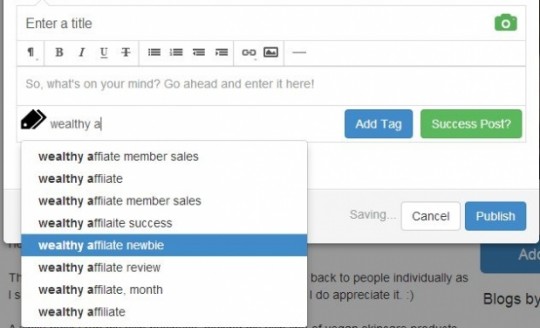
If your tag is a fairly common one, a list of similar tags will appear in a drop down menu. In this case I decided 'wealthy affiliate newbie' would be a better tag, so I moved my cursor to that. It highlighted in blue, then I clicked it.
If your word doesn't have a drop down box appear, it just means other people haven't used it. That's OK, then you just finish writing your tag and click the blue 'add tag' button.
Once you have added the tag, it will appear underneath in white writing on a blue background. That means your tag is attached to your post. The little cross in the circle next to it is there so you can remove it if you decide it's not right. Maybe you misspelled a word or maybe you decide that isn't the right tag after all. If you want to keep the tag, then do nothing.
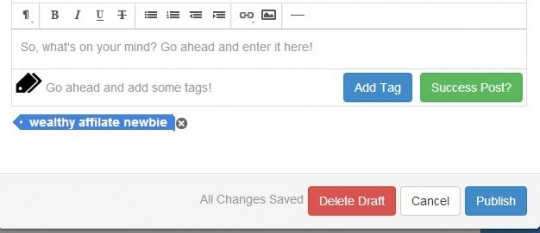
Once you have your 2 tags or more appear like this, then you simply click on the publish button at the bottom.
Share this insight
This conversation is happening inside the community.
Join free to continue it.The Internet Changed. Now It Is Time to Build Differently.
If this article resonated, the next step is learning how to apply it. Inside Wealthy Affiliate, we break this down into practical steps you can use to build a real online business.
No credit card. Instant access.