PowerDirector (PC & Android Video Editor) Just Dropped New Features — Here’s What&rs


If you’ve been following me for a while, you may remember I’ve recommended PowerDirector 365 as a decent video editing option for PC users—especially those of us who aren’t on a Mac and want something more affordable but still powerful.
Well, I logged in today to edit the tutorial video I dropped earlier today and saw they’ve rolled out a bunch of new features for October 2025. So, I wanted to pop in real quick with some highlights that stood out to me—especially if you’re looking to create videos for your affiliate content, reviews, social posts, or even training tutorials.
🆕 What’s New in PowerDirector - PC & Android Video Editor - October 2025 Updates
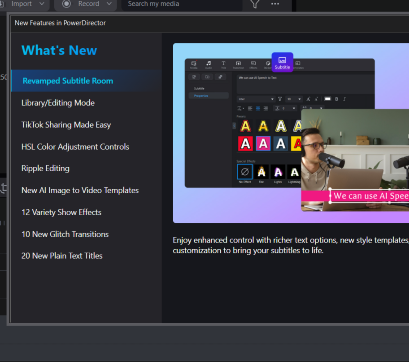
Here’s a peek at the update screen, and here are some standout features worth exploring:
✅ Revamped Subtitle RoomYou can now use AI Speech-to-Text to generate captions and subtitles more easily, plus there are new style templates and better customization tools. This is huge for accessibility and also for creators who want to repurpose content into reels or social clips with subtitles.
✅ TikTok Sharing Made EasyThere's now a direct TikTok export option. If you’re creating short-form videos for your content or reviews, this makes cross-posting that much faster.
✅ AI Image-to-Video TemplatesThis one’s still a bit experimental, but the idea is you can turn AI-generated images into animated video segments. Could be a fun way to spice up product tutorials or storytelling posts.
✅ New Text Styles, Effects & Transitions- 20 New Plain Text Titles
- 10 New Glitch Transitions
- 12 Variety Show Effects
These might seem like small updates, but if you like to keep your videos visually fresh without needing graphic design skills, they can save time and give your content a more polished look.
🎥 Why I’m Excited
As someone who’s planning to get more consistent with video—especially for my Affiliate Bootcamp journey—this update came at the perfect time. I’ve been brainstorming how to show up more on camera while also keeping editing simple, and PowerDirector keeps making that easier with updates like these.
Plus, the AI subtitle support is going to be a game-changer for repurposing content across platforms.
💬 Your Turn
Are you using PowerDirector—or another tool—for editing your videos on PC or Android?
Have you tried any of these new features yet?
Thinking about jumping into video but not sure where to start?
Drop your thoughts, questions, or tips in the comments. I’d love to hear how you’re approaching video for your site or social channels—and I’m happy to share more about my process, too!
~ Marlinda 🎥🙌🏽
Join FREE & Launch Your Business!
Exclusive Bonus - Offer Ends at Midnight Today
00
Hours
:
00
Minutes
:
00
Seconds
2,000 AI Credits Worth $10 USD
Build a Logo + Website That Attracts Customers
400 Credits
Discover Hot Niches with AI Market Research
100 Credits
Create SEO Content That Ranks & Converts
800 Credits
Find Affiliate Offers Up to $500/Sale
10 Credits
Access a Community of 2.9M+ Members
Recent Comments
6


Hey Marlinda,
Thank you for sharing, what is the pricing? Is this the Microsoft one? There are about three or four different companies making PowerDirector. I know that Cyberlink's software used to be great and affordable.

So first I'll make a disclaimer that I'm NOT an affiliate of Cyberlink.
That being said, I use Cyberlink PowerDirector and it depends which package you get because they have photo, sound and other editors as well. They're also rolling out AI tools too.
Personally, I use PowerDirector365 for Windows (Microsoft) and the price ranges because they've always got promotions going on. I think I pay about $60/yr, I do the yearly subscription but you can check it out on their page.
I also use the phone app but thats a seperate subscription. I think its $30 or so. Its really good for a phone video editor but the AI captions generator is a bit glitchy.
Hope this helps and lmk if you have any other questions,
Marlinda
Hey Marlinda,
Ok, thank you very much for this information. You can always add subtitles using a different editor like Capcut, MS Clipchamp, etc.

This is good, Thank you Marlinda, i will be getting into video in my site, i will keep Power Director in mind👍
Awesome! I'm glad this info helped you. If you have any questions or need help with video editing lmk, I'm happy to help :)
Good job for adding more value to your site. Keep it up!
See more comments
Join FREE & Launch Your Business!
Exclusive Bonus - Offer Ends at Midnight Today
00
Hours
:
00
Minutes
:
00
Seconds
2,000 AI Credits Worth $10 USD
Build a Logo + Website That Attracts Customers
400 Credits
Discover Hot Niches with AI Market Research
100 Credits
Create SEO Content That Ranks & Converts
800 Credits
Find Affiliate Offers Up to $500/Sale
10 Credits
Access a Community of 2.9M+ Members
this is awesome thanks for sharing