When “Excluded by ‘noindex’ tag” Is Not A Problem In Google Search Console


Published on November 23, 2025
Published on Wealthy Affiliate — a platform for building real online businesses with modern training and AI.


I remember the first time I opened my Google Search Console reports and saw a long list of warnings. It felt like Google was telling me my site was broken. One of the most worrying messages was this one:
“Excluded by ‘noindex’ tag.”
At that moment I thought, “Maybe Google is not indexing my site at all.” I know many other website owners feel the same when they see this section in the “Why pages aren’t indexed” report.
In this guide, I want to explain why this message is often normal, and sometimes even a good sign, using real examples from my own site, johnshalom.com.
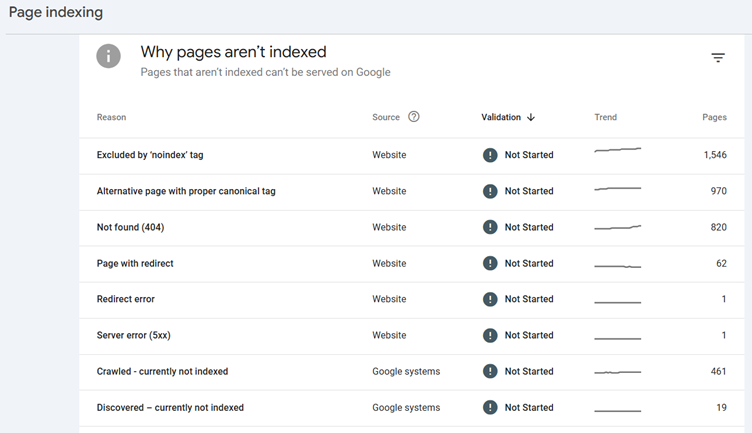
- What “Excluded by ‘noindex’ tag” really means
- Google can see the URL.
- Google crawled it or at least discovered it.
- That URL has a rule that says: “Do not index this page.”
- That rule usually comes from:
4.1. A meta tag in the HTML, such as content="noindex"
4.2. An HTTP header, such as X-Robots-Tag: noindex
4.3. Your SEO plugin or theme settings.
So “Excluded by ‘noindex’ tag” does not mean “Google hates your site” or “your whole site is blocked.” It normally means “You, your plugin, or your theme told Google not to index this type of page.”
Example 1: /feed/ URLs
Here is a real URL that showed up in my own report:
https://johnshalom.com/how-to-use-blockchain-technology-to-secure-your-online-transactions/feed/
At first, it looked like a serious issue. Then I realised:
- This is not the main article.
- It is the RSS feed for that article.
- RSS feeds are built for apps, email services, and readers, not for keywords and rankings.
- Many SEO setups add “noindex” to feed URLs on purpose.
So when Search Console lists “Excluded by ‘noindex’ tag” for URLs that end with /feed/, that is usually correct. It helps keep duplicate or low-value pages out of the search index. Your real article is the one without /feed/ at the end.
Example 2: date archive URLs
Another example from my site is:
https://johnshalom.com/2025/05/18/
This is not a blog post. It is a date archive page that lists posts published on 18 May 2025.
Most SEO plugins such as Yoast or Rank Math give you options to switch date archives and author archives to noindex by default, especially for single-author blogs. The reasons are simple:
- Date archives usually repeat the same posts in another layout.
- The content is thin and not very unique.
- These pages rarely attract meaningful search traffic.
- They can create many extra URLs with nearly the same content.
So when Google says “Excluded by ‘noindex’ tag” for a date archive like /2025/05/18/, that is not a sign that your main articles are in trouble. It simply means your plugin told Google: “Do not index archive pages.”
What you should actually worry about
The real problem appears when your important posts and pages are excluded. These are the URLs you truly want to rank, for example:
Ready to put this into action?
Start your free journey today — no credit card required.
https://yourdomain.com/your-main-article/
If Google Search Console shows these main article URLs as:
“Excluded by ‘noindex’ tag”
then you need to investigate.
Here is a simple way to check:
- Go to URL Inspection in Google Search Console.
- Paste the main article URL (no /feed/, no date archive, just the real post).
- Look at the “Page indexing” result:
3.1. If it says “URL is on Google,” you are fine.
3.2. If it says “URL is not on Google: Excluded by ‘noindex’ tag,” then there is a setting somewhere that tells Google not to index that page. - Four common sources of noindex in WordPress
If you are using WordPress, the noindex instruction usually comes from one of these places.
- Global WordPress setting
- In your WordPress dashboard, go to Settings > Reading.
- Find “Search engine visibility.”
- If “Discourage search engines from indexing this site” is checked, uncheck it.
- Save changes.
If that box is checked, your entire site may be sending noindex signals.
SEO plugin per-page setting
On each important page or post:
- Edit the page or post in WordPress.
- Scroll to the SEO plugin panel (Yoast, Rank Math, All in One SEO, SEOPress, etc.).
- Look for settings like:
3.1. “Allow search engines to show this page in search results?”
3.2. “Index / Noindex”
3.3. “Search Engine Visibility” - Set it to:
4.1. Yes
4.2. Index
4.3. Show in search results - Update the post.
- SEO plugin global settings
Inside your SEO plugin, there are global settings for “Content Types,” “Taxonomies,” and “Archives.” Here you decide which groups of content are indexable.
A common setup for a small or single-author blog looks like this:
- Posts: index
- Pages: index
- Categories: index or noindex (depends on your strategy)
- Tags: often noindex
- Date archives: noindex
- Author archives: noindex on single-author sites
If your main posts or pages are set to noindex in these global settings, Search Console will report them as excluded.
Server or security rules
Sometimes, noindex is sent as part of an HTTP header, such as X-Robots-Tag: noindex. This can come from:
- Hosting configuration
- Security plugins
- Custom code
If you do not see noindex in the HTML source, but Search Console still says the URL is noindex, this might be the reason. In that case, you may need your host’s help to remove or adjust that header.
How I read my “Why pages aren’t indexed” report now
Today, when I look at the “Why pages aren’t indexed” section in Google Search Console, I do not panic when I see a high number under “Excluded by ‘noindex’ tag.” Instead, I move through three calm steps.
- I check what kind of URLs they are:
1.1. Do they end with /feed/?
1.2. Are they date archives like /2025/05/18/?
1.3. Are they tag or category archives?
1.4. Are they special pages I do not care to rank?
If yes, I accept that many of them should stay noindex. - I check a few key posts:
2.1. I pick some of my most important articles.
2.2. I inspect each one using URL Inspection.
2.3. I confirm that:
– They are not excluded by noindex.
– If they are, I fix the settings in WordPress and the SEO plugin. - I confirm my SEO plugin strategy:
3.1. Are posts and pages set to index?
3.2. Are the archives I do not like set to noindex on purpose?
3.3. Does this match what I want from Google search?
If these three checks are fine, I return to my writing with peace of mind.
You can place your Google Search Console screenshot link again here as a reminder for readers:
https://your-gsc-why-pages-arent-indexed-screenshot-link-here
A simple checklist you can follow
If you are worried by the “Excluded by ‘noindex’ tag” message, walk through this quick checklist.
- Look at the types of URLs:
1.1. /feed/ URLs: usually fine as noindex.
1.2. Date archives: usually fine as noindex.
1.3. Tag archives and other utility pages: often fine as noindex.
1.4. Main posts and pages: these should be index, not noindex. - Confirm site visibility:
2.1. WordPress Settings > Reading.
2.2. Make sure “Discourage search engines from indexing this site” is not checked. - Inspect an important URL:
3.1. Use URL Inspection on your best article.
3.2. If it is excluded by noindex, adjust the per-page SEO setting and set it to index. - Review your SEO plugin settings:
4.1. Posts and pages should be allowed in search results.
4.2. Archives can be index or noindex based on your plan. - After changes, request indexing:
5.1. In URL Inspection, click “Request indexing” for your key posts and pages that you just fixed. - Final encouragement
Google Search Console is a powerful tool, but its labels can sound scary. “Excluded by ‘noindex’ tag” often describes a technical choice, not a crisis.
For feeds, date archives, and many types of archive pages, noindex is normal and even healthy. What truly matters is that your main posts and pages are indexable, and that your global settings match your goals.
Once those are in place, you can stop worrying about this message, insert your screenshot into your Wealthy Affiliate post, and focus on what matters most: creating useful content and building your online business with patience and clarity.
Share this insight
This conversation is happening inside the community.
Join free to continue it.The Internet Changed. Now It Is Time to Build Differently.
If this article resonated, the next step is learning how to apply it. Inside Wealthy Affiliate, we break this down into practical steps you can use to build a real online business.
No credit card. Instant access.