A Simple Start: How to Add a Domain and Build a New Website in Wealthy Affiliate


Published on February 25, 2026
Published on Wealthy Affiliate — a platform for building real online businesses with modern training and AI.

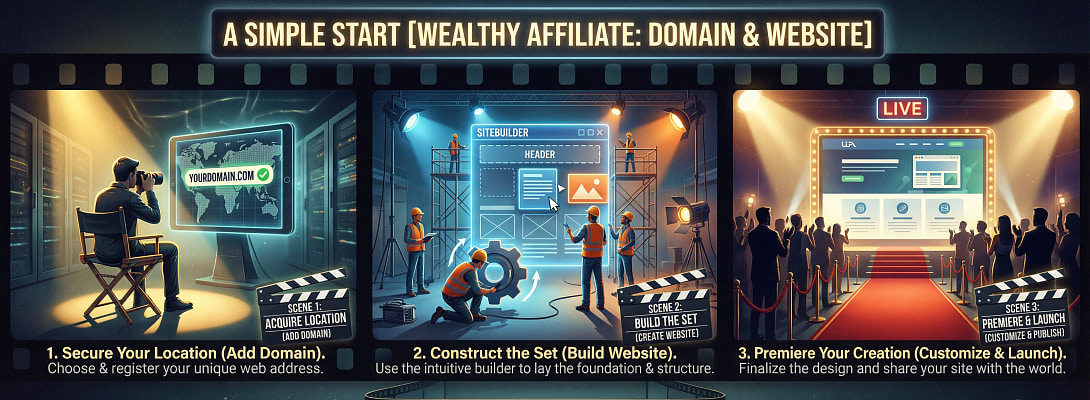
When I first started building websites inside Wealthy Affiliate, I remember feeling both excited and cautious. I did not want to “break” anything. I did not want to waste one of my site slots. And I definitely did not want to connect a domain the wrong way.
The good news is this: once you understand the flow, it becomes routine. Clean. Repeatable. Almost boring in a good way.
Let me walk you through this step by step, the way I wish someone had explained it to me at the beginning.
First: Check Your 10 Website Slots
If you are on Premium Plus+, you have 10 active website slots.
That sounds like a lot. Until you experiment.
Here is what many new members do (I did it too):
You build one SiteRubix test site.
Then another idea comes.
Then a niche experiment.
Then a practice blog.
Before you know it, you are at 8 or 9 sites.
Important things to remember:
- Free SiteRubix sites count toward your 10 slots.
- Paid domains also count.
- Test sites can quietly eat your space.
If you are getting close to 10:
- Move serious projects to proper paid domains.
- Delete unused test sites.
- Keep your slot space clean and intentional.
Think long-term, not experimental clutter.
Now let’s build properly.
How to Add a Domain to Wealthy Affiliate
There are two scenarios: you already own the domain somewhere else, or you want to buy it inside WA.
If You Already Own the Domain (Namecheap, GoDaddy, etc.)
This is common. I have done this many times.
Here is the process:
- Go to Websites inside Wealthy Affiliate.
- Open the Domains area.
- Choose Add/Connect a Domain.
- Enter your domain name and follow the prompts.
WA will then give you DNS details. These may be:
- Nameservers
or - A record / CNAME record details
Now:
Ready to put this into action?
Start your free journey today — no credit card required.
- Log in to wherever you purchased the domain.
- Open the DNS settings.
- Copy the DNS details exactly as WA shows them.
- Save the changes.
Then:
- Return to WA and verify the connection.
Sometimes DNS changes take a little time. Do not panic if it does not connect instantly. That delay is normal.
The first time I did this, I kept refreshing the page every 30 seconds. Now I simply update it and go do something productive.
If You Want to Buy the Domain Through Wealthy Affiliate
This is even simpler.
- Go to Websites → Domains.
- Search for the domain name you want.
- Register it.
- Complete the purchase.
Once done, the domain appears in your WA domain list, ready to attach to a website.
No external DNS work needed. Everything is already configured.
For beginners, this is the smoothest option.
How to Create Another Website (Using SiteRubix or Your Domain)
Once your domain is ready, you can build the site.
Here is the process:
- Go to Websites.
- Click Add Website.
- Choose the setup option.
- Select the domain you added (this is recommended for serious projects).
- Choose WordPress.
- Pick a simple theme.
- Click Build Website.
That is it.
When it finishes, click Log in to WordPress directly from inside WA.
This is where your real building begins.
Quick Front-End Setup (Especially for a Retreat Center Site)
When I launch a new site, I always do these basics first before touching design details.
Inside WordPress:
Set Permalinks
Go to Settings → Permalinks → choose Post name.
This keeps your URLs clean and professional.
Create Your Core Pages
For a retreat center, I would start with:
- Home
- About
- Retreats or Programs
- Gallery
- Contact
- Donate (if needed)
Do not overcomplicate this stage. Structure first. Beauty later.
Build a Clean Top Menu
Link your main pages in the primary navigation. Keep it simple.
Add Your Branding
Upload your logo.
Set your main colors.
Add contact details in the footer.
When I built one of my early sites, I wasted time adjusting tiny font sizes before I even had proper pages. Now I build structure first. Design later.
Structure creates confidence.
A Word About Site Management Strategy
If this retreat center is serious and long-term, use a paid domain.
Use SiteRubix mainly for:
- Testing ideas
- Training
- Practice
Your real work deserves its own domain.
If you tell me how many active sites you currently have inside your WA account, I can help you decide the safest way to add this new one without hitting your 10-slot limit.
Building online becomes easier when you treat it like a system, not a series of experiments.
You are not just “adding a website.”
You are building digital real estate.
Share this insight
This conversation is happening inside the community.
Join free to continue it.The Internet Changed. Now It Is Time to Build Differently.
If this article resonated, the next step is learning how to apply it. Inside Wealthy Affiliate, we break this down into practical steps you can use to build a real online business.
No credit card. Instant access.