WooCommerce and Product Data Tabs


Published on October 4, 2017
Published on Wealthy Affiliate — a platform for building real online businesses with modern training and AI.
Hi, Y'all!
Been working on a new website for sometime now ... it's been the biggest challenge yet because it's not related to affiliate marketing at all. This has resulted in my ranking dropping dramatically here at WA, but the lady can only do one thing at a time. :-)
We will be providing monthly subscriptions on this site so we installed WooCommerce. And y'all know what? The more I get into this stuff the more I realize how much I just don't know.
Ready to put this into action?
Start your free journey today — no credit card required.
Previously, I'd asked for help with WooCommerce so we could have digital products available. It was awesome advice (because we have an awesome WA community). Everything worked like a charm.
But today, I've been trying to get it set-up for monthly subscriptions (you know - 'cause it's nice to get paid). If you're familiar with WooCommerce, then you know there is a section entitled "Product Data."
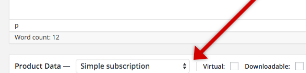
Unfortunately, the three tabs to the right of Product Data are not visible. And there's nothing I've done to magically make them appear. There's an image so you can see how it should look; the red arrows point to the area where the drop-down and 2 tick-off spaces should be (but they're not at my site).
Many Thanks and God Bless!
Share this insight
This conversation is happening inside the community.
Join free to continue it.The Internet Changed. Now It Is Time to Build Differently.
If this article resonated, the next step is learning how to apply it. Inside Wealthy Affiliate, we break this down into practical steps you can use to build a real online business.
No credit card. Instant access.