How to cancel Google Adsense disapproved or Incomplete accounts


Published on March 3, 2021
Published on Wealthy Affiliate — a platform for building real online businesses with modern training and AI.

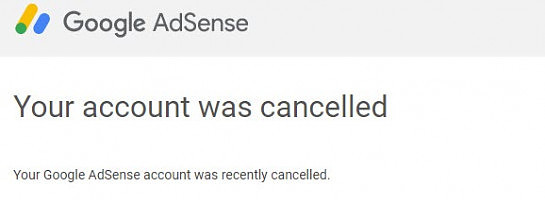
I could not close my Google Adsense account due to an unverified postal address. Then I could not find a solution on Google’s site. After searching for hours, I found the solution. That’s to close the payment profile. I wrote it down in case someone needs it or I can use it in the future.
If you can’t delete or close Google Adsense account due to some reasons, you can follow these steps to close the payment profile as well. After that, the Google Adsense service will be canceled automatically.
1) Open Google Chrome.
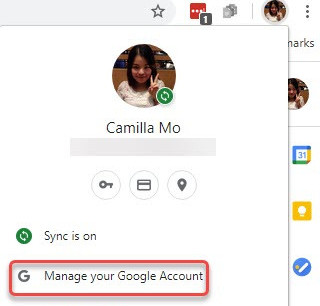
2) Click the profile icon in the top right corner, and select Manage your Google Account.
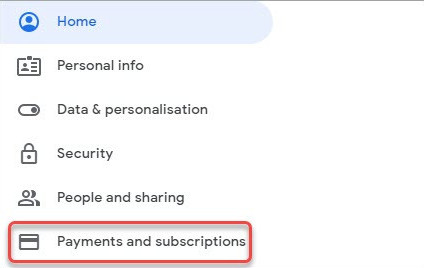
3) Click on Payments and subscriptions.
Ready to put this into action?
Start your free journey today — no credit card required.
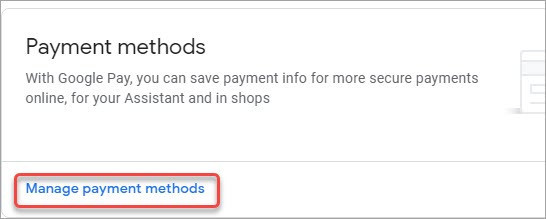
4) Click on Manage payment methods.
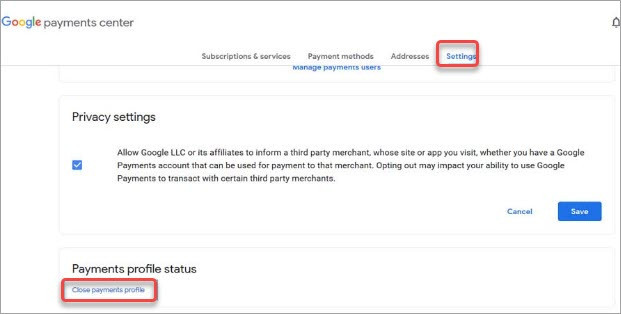
5) Click on the Settings tab and then click on Close Payments Profile.
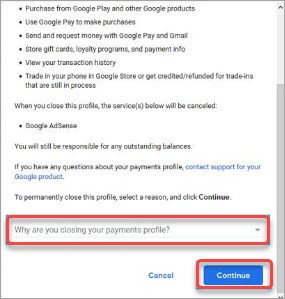
6) Select a reason to close the payment file. If you’re not sure which reason is appropriate, choose “I had a bad experience with a seller”. Then click on Continue.
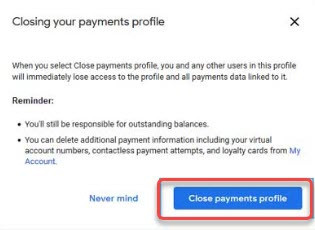
7) Read the warning message and click on Close payment profile. Then the Payment profile will be deleted immediately. After that, you’ll receive an email that informs you your Adsense Account is closed.
That’s all.
Share this insight
This conversation is happening inside the community.
Join free to continue it.The Internet Changed. Now It Is Time to Build Differently.
If this article resonated, the next step is learning how to apply it. Inside Wealthy Affiliate, we break this down into practical steps you can use to build a real online business.
No credit card. Instant access.