How to create a Footer menu


Published on February 11, 2014
Published on Wealthy Affiliate — a platform for building real online businesses with modern training and AI.
I was struggle by how to insert a footer menu in my theme of wordpress, i was looking a plug-in , but anyone could help me around the web.
So i found a code to insert through "Editor" in "Theme Functions"
Add the following code to the functions.php file for your theme:
// This theme uses wp_nav_menu() in two locations. register_nav_menus( array( 'primary' => __( 'Primary Navigation', 'twentyten' ), 'secondary' => __('Secondary Navigation', 'twentyten') ) );
Then... you can now create in Menu the "Secondary Menu"
And you will need to insert this code to display in the theme , you will insent into the footer.php
Ready to put this into action?
Start your free journey today — no credit card required.
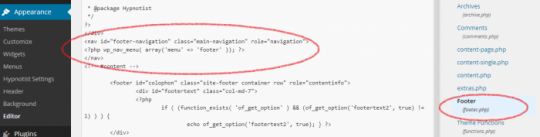
This is the code :
<nav id="footer-navigation" role="navigation">
<?php wp_nav_menu( array('menu' => 'footer' )); ?>
</nav>
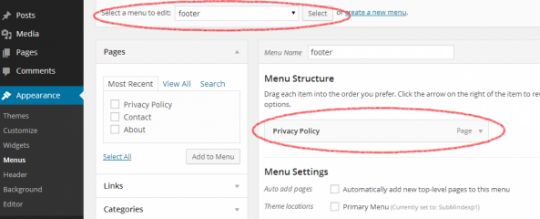
You will have to create a new menu : called by preference "footer" to manage the menu to display in the footer of the theme. Remember that you can structure your footer menu

Please , any feedback to the community will be great for us ! :D
I hope to this article will be useful.
Share this insight
This conversation is happening inside the community.
Join free to continue it.The Internet Changed. Now It Is Time to Build Differently.
If this article resonated, the next step is learning how to apply it. Inside Wealthy Affiliate, we break this down into practical steps you can use to build a real online business.
No credit card. Instant access.