How to create a NO Follow link.


Published on July 10, 2016
Published on Wealthy Affiliate — a platform for building real online businesses with modern training and AI.

Welcome to WP CliniK
Hello to you all, I am busy writing content for my WP blog and I am doing some very comprehensive articles on HTML for beginners
I know that for many the word HTML Code sends people running for cover and as usual its fear that stops us understanding things like HTML.
So I am just going to give you a quick HTML tip to help you out
So first - What is a no follow link
You may have heard that putting external links on your site is a valuable SEO thing to do and it is a very valuable SEO signal to google, as it sends the signal to google that you are willing to share information on your niche on other websites.
One of the most common places to link to is Wikipedia, there is one small problem though and that is if you link to an external website, the web spiders will leave your page when they come across your link, as web spiders follow links and this is something you should avoid.
So the answer is to create a NO FOLLOW link
Here is how to do it
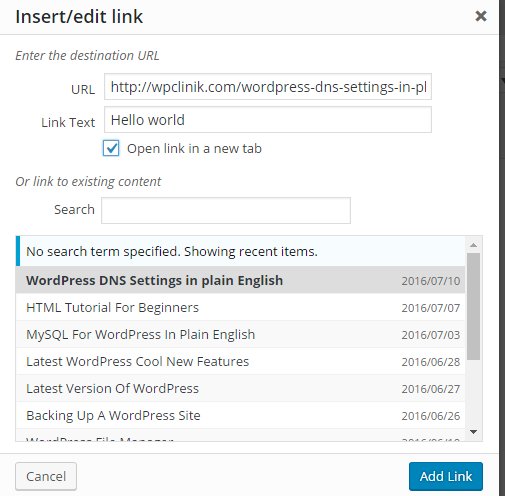
To create a link on your page or post, highlight the word or phrase and click the link icon
Ready to put this into action?
Start your free journey today — no credit card required.
Once your link is created it look like this in HTML

The first part is the page the link is pointing to
The second part means open in new tab
The third part is the link text or text that is click on to use the link
The <a> tag is used because it stands for anchor tag and an anchor links things together
So now to make this link a no follow link, you need to add an HTML attribute
This attribute looks like this
rel= "no follow"
You add this to the link code like this

So now you know what a no follow link is and how to create on should the need arise
You may also come across this concept in blog comments where the web owner will state that any links you leave with your comments will be NO FOLLOW
No follow links are widely used in SEO and for all sorts of other reasons
So now you know also what a HTML attribute is
I hope you enjoyed this tutorial
Any questions please feel free to ask
Barry
Share this insight
This conversation is happening inside the community.
Join free to continue it.The Internet Changed. Now It Is Time to Build Differently.
If this article resonated, the next step is learning how to apply it. Inside Wealthy Affiliate, we break this down into practical steps you can use to build a real online business.
No credit card. Instant access.