How do I determine the Image sizes for Blog post


Published on July 5, 2025
Published on Wealthy Affiliate — a platform for building real online businesses with modern training and AI.


Choosing the right size of Image is very important for website SEO.
On my website, I was quite confused about choosing the right image sizes for my blog posts. During a recent website audit, I discovered that my blog contained images are of various sizes, which affected the consistency and performance of my Website.
The audit recommended using a standard image size across all blog posts to help improve the overall SEO of my Website.
Why Choosing the Right Image Size Matters for Your Blog
1. Faster Page Loading = Better User Experience
Large images slow down your blog. If your page takes too long to load, visitors will leave before even reading your content.
Optimized image sizes help your blog load faster, which keeps readers happy and improves engagement.
2. Better SEO Performance
Page speed is a ranking factor for Google. Heavy or oversized images can hurt your SEO. When your site is slow, it’s harder to rank in search results.
Properly sized and compressed images improve your SEO and increase organic traffic.
3. Professional-Looking Blog Layout
Images that are too small may appear blurry. Images that are too big may break your layout or overflow on mobile screens.
Using the right size ensures your blog looks clean, consistent, and mobile-friendly.
4. Saves Storage and Bandwidth
Using unnecessarily large images consumes more server space and bandwidth—especially important if you're on shared hosting or limited plans.
Smaller, optimized images help you stay within hosting limits and avoid extra costs.
Ready to put this into action?
Start your free journey today — no credit card required.
5. Improved Social Sharing
When your blog is shared on social media, platforms like Facebook, Twitter, and LinkedIn pull the featured image. If the image isn’t the right size, it might not display properly—or at all.
Correct image sizes ensure your blog posts look great when shared.
Recommended Blog Image Sizes
Here are some common size guidelines:
Image Type Recommended Size
Blog Featured Image 1200 x 628
In-Post Images 800 x 400 or 1200 x 800
Pinterest Image 1000 x 1500
Facebook/Twitter 1200 x 628
But you can find, sometime Images are not fitted with your blog post properly. It happened mainly due to , the aspect ratio (relationship between Image height and Width) of Images are not determined properly.
How do I determine the Image sizes of Blog Post-
Step 1: Determining the Width of Blog Content Area
- Open your blog post in Google Chrome
- Right-click anywhere in the content area and choose “Inspect”
- In the developer panel that opens, click the icon in the top-left corner
- Hover your mouse over the content area until it gets highlighted in blue color.
- Your column's width (in pixels) will appear in the info box (top-right)
- The first no. is the Width (example- 573 pixels)
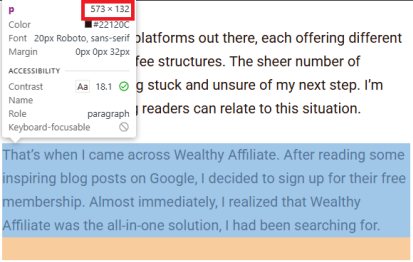
In this screenshot I marked the blog content area width in red.
Step 2: Choose the Right Image Height
After getting your Image Width, Now you have to determine the Height by following the process-
· Select any of the aspect ratio (2:3, 3:2, 4:3).
· Common or standard aspect ratio is 3:2 or 4:3 (I personally use 2:3 for my blog post which is ideal for Pinterest also).
· Now apply the formula to find the right Image height: example for 3:2 - Width (in pixels) divided by 3 and will multiply by 2.
· The result is your height.
Tip:
- Check whether your website images fit for good seo optimization or not.
- Keep your image size standard across posts for consistency.
- Use tools like Canva, Figma, or Photopea to resize your images.
- Aspect ratio may depend on what theme you are using.
Share this insight
This conversation is happening inside the community.
Join free to continue it.The Internet Changed. Now It Is Time to Build Differently.
If this article resonated, the next step is learning how to apply it. Inside Wealthy Affiliate, we break this down into practical steps you can use to build a real online business.
No credit card. Instant access.