The WA Blogger’s Guide to Pro Portraits: Master Your Personal Brand with AI


Published on April 24, 2026
Published on Wealthy Affiliate — a platform for building real online businesses with modern training and AI.
In the world of affiliate marketing and blogging, trust is your primary currency. When a reader lands on your "About Me" page, they make a split-second decision: Is this person an authority, or just another faceless site? In this blog post I want to share a method I learned that uses AI to generate a self portait of yourself in any style you can think of.
A professional headshot used to mean a $500 studio session. In 2026, all it takes is a selfie, a reference "vibe," and the power of Gemini’s Nano Banana 2 image model. I will explain how to extract the photography techniques of the pros and apply them to yourself—using structured JSON for pixel-perfect control.
Step 1: Find Your Brand "Vibe"
Don't start with a blank canvas. Go to Google Images (or where ever) and find a portrait that matches your blog’s niche.
- Tech/Business Blogger: Look for "Corporate Executive Headshot" (clean, grey backdrops, sharp suits).
- Lifestyle/Travel Blogger: Look for "Outdoor Golden Hour Portrait" (warm lighting, blurred nature backgrounds).
- Creative/Artist: Look for "Studio Editorial" (dramatic shadows, bold colors).
Action: Download the image that represents how you want your audience to see you.
Step 2: Extract the Photography "DNA"
We’re going to use Gemini to translate that inspiration photo into a technical blueprint. This ensures the AI doesn't just "guess" what you want.
- Open Gemini and attach your inspiration image. In this example I will use the following image:
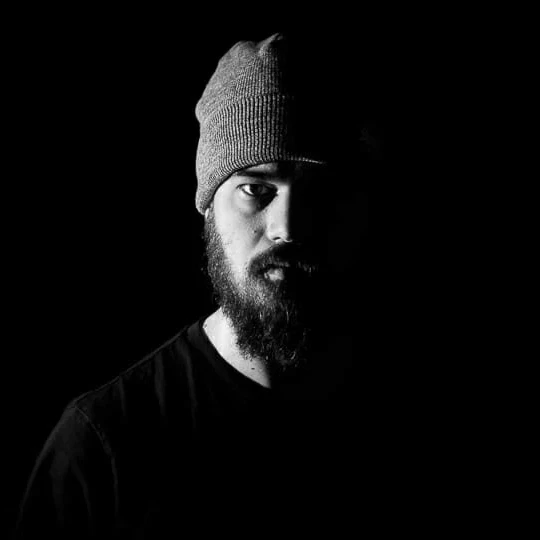
- Use this prompt:
"Describe the photography techniques in this image in JSON format, focusing on lighting, camera settings, backdrop, and composition."
What the Blueprint Looks Like
Gemini will provide a JSON block. It acts as the "instructions" for your new photo:
JSON
Ready to put this into action?
Start your free journey today — no credit card required.
{
  "photography_techniques": {
    "lighting": {
      "style": "Split Lighting",
      "description": "A dramatic technique where the light source illuminates only half of the subject's face, creating a sharp division between light and shadow.",
      "key_features": [
        "High contrast",
        "Chiaroscuro effect",
        "Low-key lighting"
      ]
    },
    "composition": {
      "framing": "Close-up Portrait",
      "rule_of_thirds": "Subject is positioned slightly off-center to the left, creating negative space on the right.",
      "perspective": "Eye-level",
      "negative_space": "Extensive use of solid black background to emphasize the subject."
    },
    "color_and_tone": {
      "palette": "Monochrome (Black and White)",
      "tonality": "High-contrast with deep blacks and bright highlights, eliminating mid-tones for a moody, intense atmosphere.",
      "texture": "Emphasis on the texture of the beanie and facial hair through the side-lighting."
    },
    "subject_treatment": {
      "mood": "Introspective, mysterious, or intense",
      "focus": "Sharp focus on the visible eye and facial features",
      "wardrobe": "Simple dark t-shirt and beanie to minimize distractions and keep the focus on the face."
    }
  }
}
Step 3: The Fusion (Generating Your Photo)
Now, we combine your face with that professional blueprint.
- Upload a clear, well-lit selfie of yourself (look directly at the camera). For this example I will use this:

- Paste the JSON block from Step 2.
- Use this prompt:
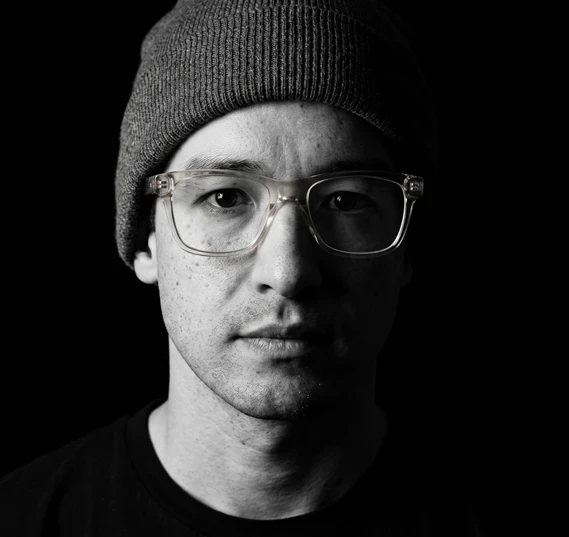
"Generate a professional headshot of this subject based on the following JSON file. Maintain the subject's exact facial structure and identity while applying these photography specifications."
The output will be yourself in the exact stlye of your reference 'vibe' photo. Here's what it generated for me:
Why Use JSON Instead of a Simple "Style Swap"?
You might wonder: Why not just upload two photos and ask Gemini to "make me look like this other picture"? The problem with simple image-to-image style transfer is that the AI often treats the entire image as a single "vibe," which can lead to it accidentally changing your facial structure or losing the specific details that make you you.
By using JSON, you are speaking the AI’s "native language" of structured data. This creates a Parameter Isolation effect: you can command the AI to apply the 85mm lens and studio lighting of the reference photo while keeping your unique identity strictly protected. It turns the AI from a creative guesser into a precise digital photographer that follows your manual settings. Furthermore, it gives you granular control over the final result. Instead of crossing your fingers for a better "random" generation, you can simply go back to your JSON file, tweak a single variable—like the lighting intensity or the backdrop color—and run it again. This iterative process allows you to polish your image until it matches your brand vision perfectly without starting from scratch.
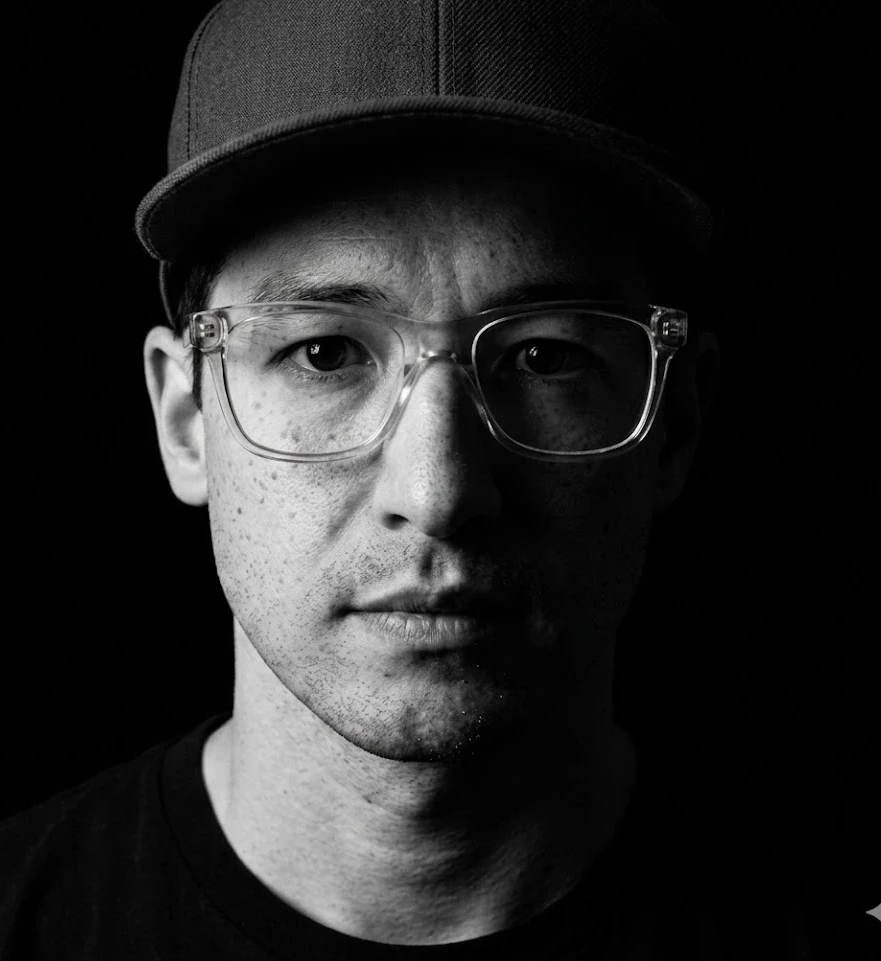
To illustrate this, say I wanted to keep everything the same but just swap the bean for a baseball cap. I would just alter this line:
"wardrobe": "Simple dark t-shirt and beanie to minimize distractions and keep the focus on the face."
To:
"wardrobe": "Simple dark t-shirt and baseball cap to minimize distractions and keep the focus on the face."
And when I run it again I get:
⚠️ A Word of Caution: The Authenticity Factor
While the AI can make you look like you’re in a high-end studio, don't let it turn you into someone you're not.
The goal of a personal brand is to be relatable and real. If your AI headshot looks too "perfect," airbrushed, or fundamentally changes your facial features, you will fall into the "Uncanny Valley." This triggers a subconscious distrust in your readers.
The Golden Rule: Use this tool to enhance the quality of your photo (lighting, background, camera gear), not to replace your identity. Your audience wants to connect with you, not a plastic mannequin version of you. If you meet a reader in person, they should recognize you immediately from your blog photo.
Unlimited Versatility: Not Just for Headshots
This "Seed Image + JSON" method works for any style of self-portrait. As a Wealthy Affiliate member, you can use this to create:
- Lifestyle shots for your fitness blog by using an outdoor gym photo as your seed.
- Author portraits for your Kindle book by using a "moody library" seed image.
- Candid "work from home" shots for your reviews.
By selecting a different Base Seed Image, you are essentially hiring a new photographer every time. You provide the face; the JSON provides the expertise.
I've found this method pretty useful and I hope you do too. It takes no time at all and gives you the ability to generate photos in any style without needing to know the technical terms you would need in order to describe it yourself.
Share this insight
This conversation is happening inside the community.
Join free to continue it.The Internet Changed. Now It Is Time to Build Differently.
If this article resonated, the next step is learning how to apply it. Inside Wealthy Affiliate, we break this down into practical steps you can use to build a real online business.
No credit card. Instant access.