Namecheap Transfer DNS - November 2015 - Updated Screens


Hi,
I barely had time to take a nap and the Namecheap screen changed again.
Not sure if this is better, but you can change the Nameservers to Custom, and enter the WA Nameservers:
ns1.mywahosting.com
ns2.mywahosting.com
To save, click on the tiny green check mark.
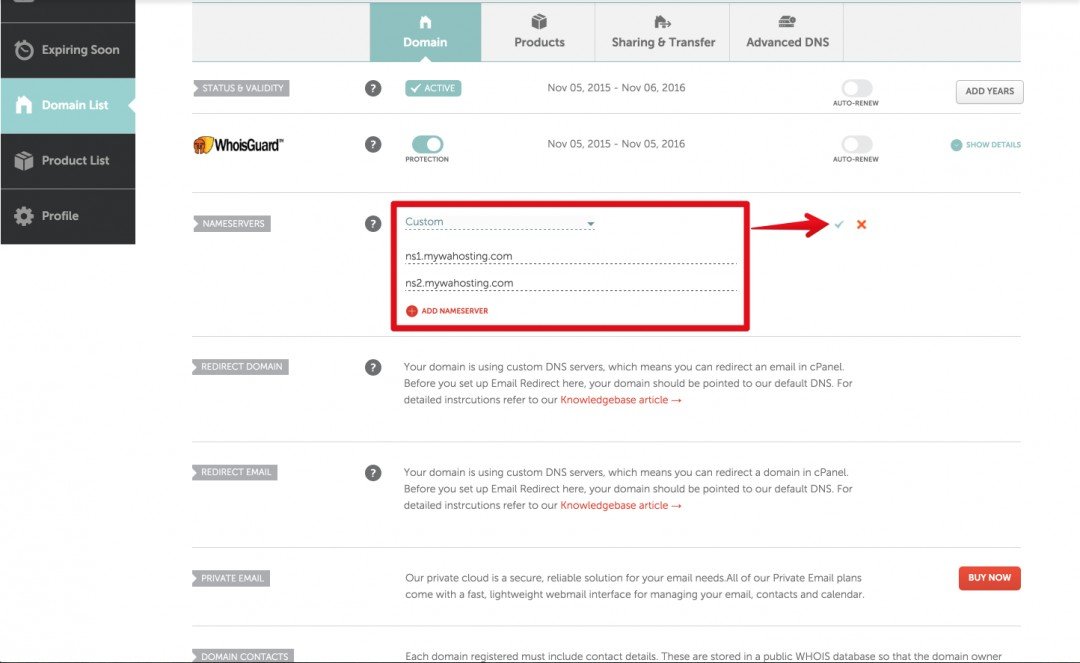
Save your changes and wait for the transfer.
You can track the progress by using this link and entering your new domain name:
Check the Nameservers: https://www.whatsmydns.net/#NS/
Check the Propagation: https://www.whatsmydns.net/#A/
When you see green check marks, you know it's starting to transfer.

Hope this helps!
Join FREE & Launch Your Business!
Exclusive Bonus - Offer Ends at Midnight Today
00
Hours
:
00
Minutes
:
00
Seconds
2,000 AI Credits Worth $10 USD
Build a Logo + Website That Attracts Customers
400 Credits
Discover Hot Niches with AI Market Research
100 Credits
Create SEO Content That Ranks & Converts
800 Credits
Find Affiliate Offers Up to $500/Sale
10 Credits
Access a Community of 2.9M+ Members
Recent Comments
42


Thank you fo this great information!
I have an account there and this was very helpful to me.
Linda


These are the sort of blogs that help folks like me and a few others.
Awesome. Bet you did not have any trouble posting an image either.
Nice work Sir.
See more comments
Join FREE & Launch Your Business!
Exclusive Bonus - Offer Ends at Midnight Today
00
Hours
:
00
Minutes
:
00
Seconds
2,000 AI Credits Worth $10 USD
Build a Logo + Website That Attracts Customers
400 Credits
Discover Hot Niches with AI Market Research
100 Credits
Create SEO Content That Ranks & Converts
800 Credits
Find Affiliate Offers Up to $500/Sale
10 Credits
Access a Community of 2.9M+ Members
Thankyou, Gary, will be sure to get on this when I get back from work. You da man. :)