Wordpress and GDPR Compliance - How to add the popup without a plugin
I have seen many WA members ask about this and many runs to plugins. So I thought I should write a tutorial blog post to help give people another option which is much easier. I like to look for outside sources that can help me solve some minor issues without having to always install something. I found just that and maybe this will help you to. I did do this for all my websites and it does work.
For anyone who wants that popup message on their websites, all you have to do is complete this form on Silktibe (which is very easy and fast). Step by step photo tutorial below. There is nothing to freak out about or get nervous. It really is very easy. You do not need to sign up ether.
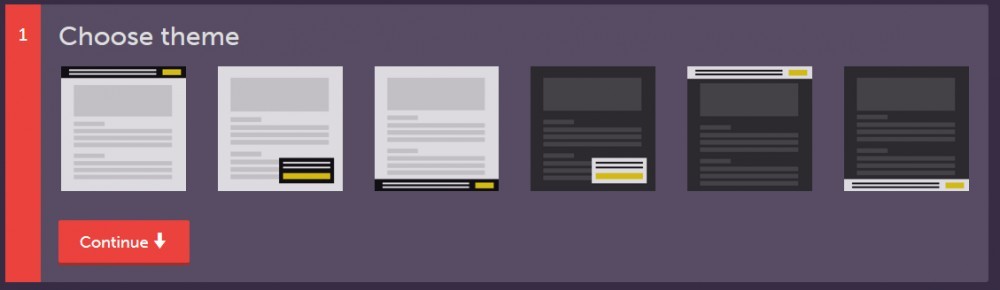
There are 6 styles to choose from. Top, right, bottom sides. It also comes it two color shades black or white.
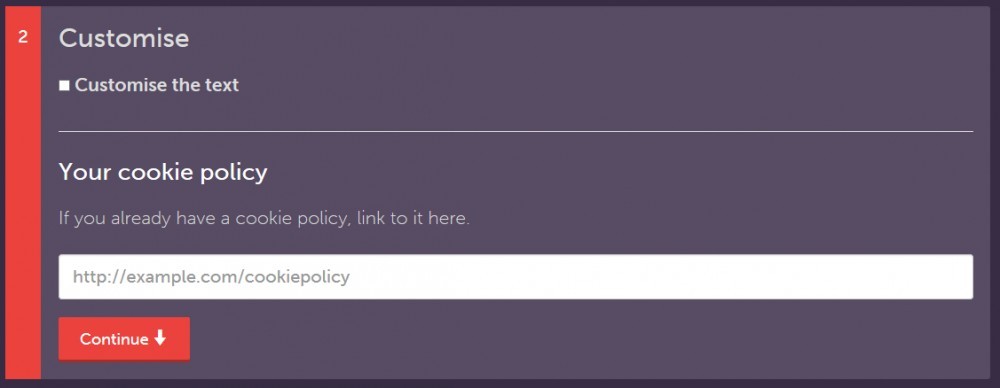
Here you can paste your Privacy Policy link.
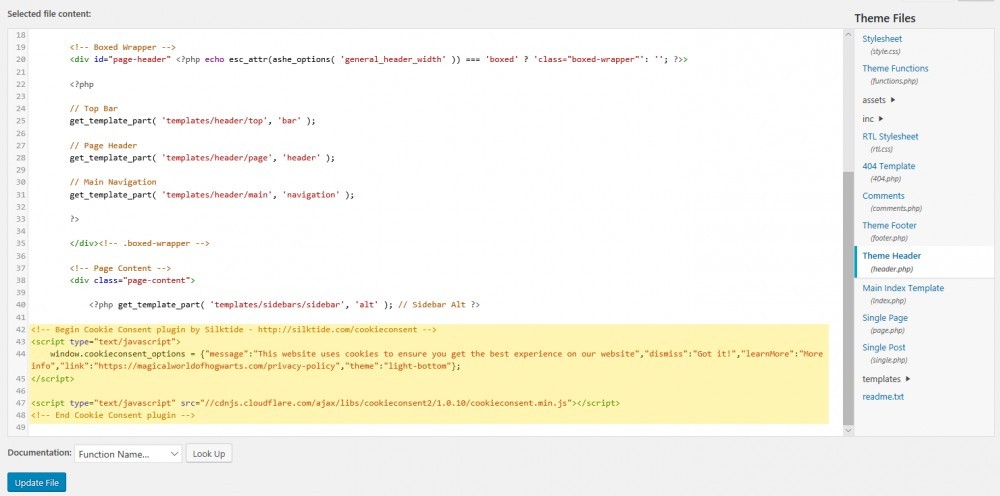
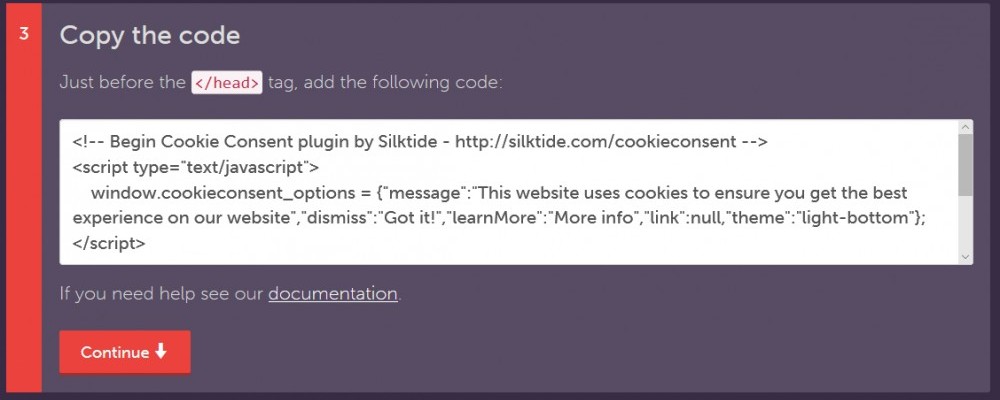
Copy the provided code. Then go to Appearence>Editor, scroll down from the list on your right side until you see Theme Header. Paste the code below that then update file. All done! :)
This last step is optional, you do not need to do it.

Join FREE & Launch Your Business!
Exclusive Bonus - Offer Ends at Midnight Today
00
Hours
:
00
Minutes
:
00
Seconds
2,000 AI Credits Worth $10 USD
Build a Logo + Website That Attracts Customers
400 Credits
Discover Hot Niches with AI Market Research
100 Credits
Create SEO Content That Ranks & Converts
800 Credits
Find Affiliate Offers Up to $500/Sale
10 Credits
Access a Community of 2.9M+ Members
Recent Comments
6
Join FREE & Launch Your Business!
Exclusive Bonus - Offer Ends at Midnight Today
00
Hours
:
00
Minutes
:
00
Seconds
2,000 AI Credits Worth $10 USD
Build a Logo + Website That Attracts Customers
400 Credits
Discover Hot Niches with AI Market Research
100 Credits
Create SEO Content That Ranks & Converts
800 Credits
Find Affiliate Offers Up to $500/Sale
10 Credits
Access a Community of 2.9M+ Members

Hi Roseberry! Thanks for posting this quick walkthrough on how to install this without having to use a plugin. I've already got 5 plugins running right now and I cannot delete any of them to make room for another one. So this was a perfect way around that.
Would you happen to know if there is a way to do social share without needing a plugin for that as well?
Thanks again! Tina
Hope this helped you :)
I'm not sure for social media but I can look into it. I do know there is a good plugin I use to auto-post on my social media accounts without having to log online on each account.
Oh! I would be very interested in that plugin. That sounds awesome! Any way I can save myself some time is great progress in my book.
I'm assuming it is like this one and it won't put me over my plugin limit?
And yes this helped me out a lot. I've been clipping away plugins that aren't essential to maximize my site and I really didn't want to add a 6th one.
Thanks for your help! Tina
I actually use only 3 plugins. All In One SEO Pack, Contact Form, and Blog2Social. The Blog2Social shows you the calendar, recent posts, and your activity. Downside to this plugin however is I can't put the social sharing buttons without having to install a different plugin for it. So if I can figure that part out to with simple coding like I did for this issue then I can share with members.
This is the tutorial used for Adding the buttons Adding Social Media Buttons to Your Website Happy I could help! :)
I'm using Social Warfare for my social sharing.
What about EWWW Image Optimizer? Are you not using that one?
I'm running a food blog so I'm using a recipe plugin for that.
So along with the above mentioned, I've also got Kirki Toolkit and All In One SEO Pack to make a grand total of 5.
I don't see how I can do with anything less than that. I'm looking into paying for a theme specifically for food blogging and maybe they'll have a built-in recipe maker so I can drop that plugin. And then I might be able to drop the toolkit as well depending on the theme.
Oh nice a food blog. I do enjoy a good food blog. Yes I do have the EWWW Image Optimizer but I activate that when I need to. I actually do have some food posts on my blogs but it is related to my niches Disney and Hogwarts.
I do also like to keep my autumn and winter plugins in handy for holidays and such. It makes my blog keep with the themes with colorful leaves or snowfall for example.