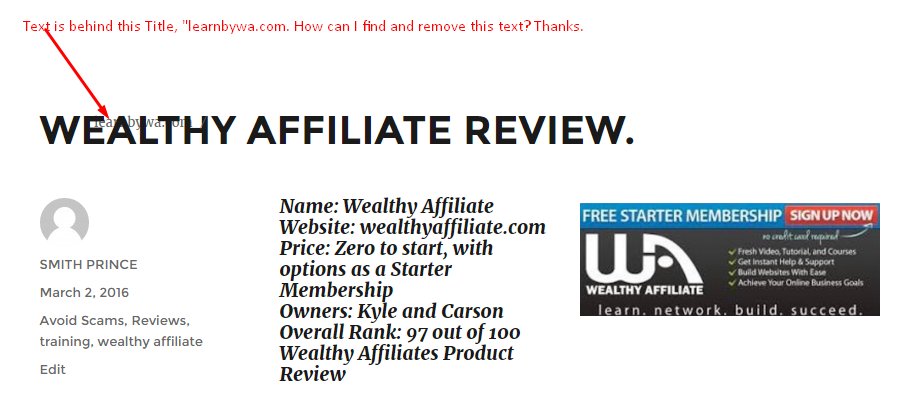
Text is behind my title.
This is a problem that I had some time ago, but other than changing my Theme, I didn't get any "FIRM" answers. Can anyone that's experience in html tell me why and how can I find and remove this text without changing my Theme. Thanks.
Join FREE & Launch Your Business!
Exclusive Bonus - Offer Ends at Midnight Today
00
Hours
:
00
Minutes
:
00
Seconds
2,000 AI Credits Worth $10 USD
Build a Logo + Website That Attracts Customers
400 Credits
Discover Hot Niches with AI Market Research
100 Credits
Create SEO Content That Ranks & Converts
800 Credits
Find Affiliate Offers Up to $500/Sale
10 Credits
Access a Community of 2.9M+ Members
Recent Comments
11
This comes from somewhere in your All in one SEO settings or your theme settings, I guess. Looking at the source code of you page, the 'learnbywa.com is in the line TWITTER TITLE and og: sitename.
I have no idea since I cannot look behind the scene
John
Hi .
Hope all is well
Please give me the name of your site so i can go have a look at it..
from Jaco
Hi..
On my android phone..it looks fine..
I will check for younon my laptop..soon
Chat soon
From Jaco
Ps c attached
See more comments
Join FREE & Launch Your Business!
Exclusive Bonus - Offer Ends at Midnight Today
00
Hours
:
00
Minutes
:
00
Seconds
2,000 AI Credits Worth $10 USD
Build a Logo + Website That Attracts Customers
400 Credits
Discover Hot Niches with AI Market Research
100 Credits
Create SEO Content That Ranks & Converts
800 Credits
Find Affiliate Offers Up to $500/Sale
10 Credits
Access a Community of 2.9M+ Members
I am guessing a theme problem. I had a theme problem a year ago when I joined and didn't know how to ask for help properly. I resolved it by getting another theme. The theme had this Loreum Ipsum language as fill for text. I didn't know how to replace it with intelligible content. One person advised I go to themes-appearance but dropped it there without completing the solution. I am now asking the question.
Thanks, MKearns.