How do i remove the background text?

9
9
3.3K followers

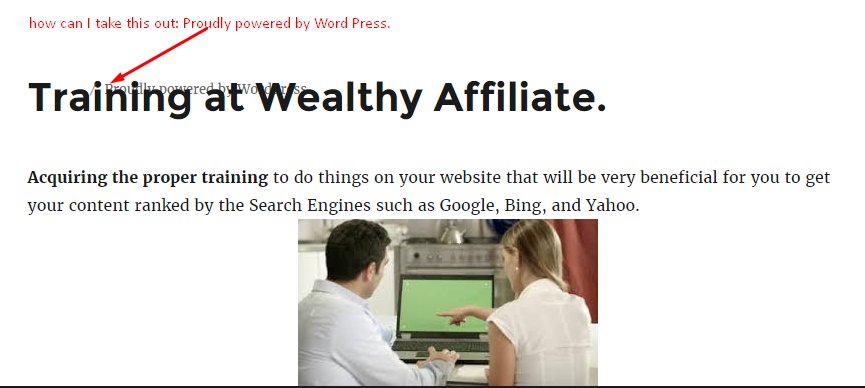
I just updated Word Press and my Twenty Fourteen Theme to Twenty Sixteen. I don't know if you can see it clearly, but there is background text behind my h1 Header:

Training at Wealthy Affiliate.

This is occurring on my learnbywa.com website. I made a Sceen Shot, I hope you'll be able to make out the text: "Proudly powered by Word Press".

This was corrected.

I went to my Theme's Footer, php. I found the html script for this text and deleted it.

Here is the Screen Shot:
9
9

Join FREE & Launch Your Business!

Exclusive Bonus - Offer Ends at Midnight Today

00

Hours

:

00

Minutes

:

00

Seconds

2,000 AI Credits Worth $10 USD

Build a Logo + Website That Attracts Customers

400 Credits

Discover Hot Niches with AI Market Research

100 Credits

Create SEO Content That Ranks & Converts

800 Credits

Find Affiliate Offers Up to $500/Sale

10 Credits

Access a Community of 2.9M+ Members

By continuing, you agree to our Terms of Service and Privacy Policy
No credit card required

Recent Comments

9

Looks like you already got it fixed.

Sorry, KDClover, this is for another site, here is the link to the blog. I don't know where I need to go to remove this text. Thanks.

I removed "Proudly powered by Word Press, I figured I miss deleting this, but I went back, but I don't see this text.

1

Frustrating I know .... this might help --you Please note : as in picture if you wanted to change to MY SITE see my image and compare with your editor screen

4

Hello, ColinU, Thanks, but why are you telling me to type in "Amazing Super Food", this doesn't have anything to do with my site. Is this something for another site?

Thank you very much, ColinU.

I routinely just delete the section you are talking about. But if someone just wants to change what the footer says you provided the right information.

Hi Prince, try deleting it in footer php in the style sheet, update the style sheet then your page and see if it is still there, If not, go back to footer php and replace it, again update the style sheet and page, if it's still not there, you're good to go! Hope this helps.

1

Hello, Harrysastar2. I appreciate your instruction for removing the text. Yours was "to the point", without getting me confuse. I did not have to add anything, I just needed to remove the text. Thank you.

1

See more comments

Join FREE & Launch Your Business!

Exclusive Bonus - Offer Ends at Midnight Today

00

Hours

:

00

Minutes

:

00

Seconds

2,000 AI Credits Worth $10 USD

Build a Logo + Website That Attracts Customers

400 Credits

Discover Hot Niches with AI Market Research

100 Credits

Create SEO Content That Ranks & Converts

800 Credits

Find Affiliate Offers Up to $500/Sale

10 Credits

Access a Community of 2.9M+ Members

By continuing, you agree to our Terms of Service and Privacy Policy
No credit card required

2.9M+

Members

190+

Countries Served

20+

Years Online

50K+

Success Stories

The world's most successful affiliate marketing training platform. Join 2.9M+ entrepreneurs building their online business with expert training, tools, and support.

© 2005-2025 Wealthy Affiliate
All rights reserved worldwide.

🔒 Trusted by Millions Worldwide

Since 2005, Wealthy Affiliate has been the go-to platform for entrepreneurs looking to build successful online businesses. With industry-leading security, 99.9% uptime, and a proven track record of success, you're in safe hands.