How to find out your LinkedIn Ranking.


Published on March 1, 2019
Published on Wealthy Affiliate — a platform for building real online businesses with modern training and AI.

Did you know that LinkedIn ranks you?
I didn't either until recently. I tuned into a webinar by Adam Houlahan, who is ranked as one of the top influencers on the network.
Anyway, to find out your LinkedIn ranking, all you need to do is log in and then paste in the following URL:
https://www.linkedin.com/sales/ssi
and it'll give you a broken down ranking.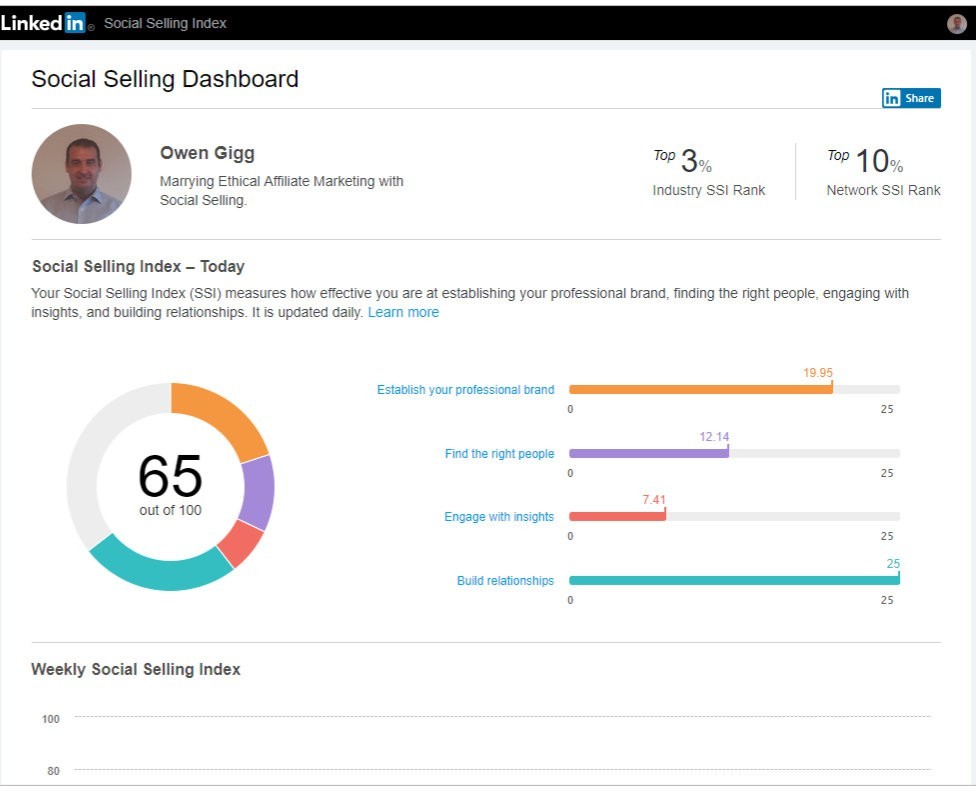
I clearly need to engage with insights more often!
550 million users on LinkedIn, so it's worth checking out.
Share this insight
This conversation is happening inside the community.
Join free to continue it.The Internet Changed. Now It Is Time to Build Differently.
If this article resonated, the next step is learning how to apply it. Inside Wealthy Affiliate, we break this down into practical steps you can use to build a real online business.
No credit card. Instant access.