Google com Keyword Tool


Published on October 9, 2016
Published on Wealthy Affiliate — a platform for building real online businesses with modern training and AI.
Here’s a quick demo on how to use the asterisk “*” wildcard in the free Google keywords suggestion tool that pops down as you type out a search phrase.
A carefully placed “*” as you type out a search phrase can yield some interesting and useful popular keyword search terms. This is really fun when using the alphabet soup technique.
Below are some example screenshots of how an asterisk changes the results.
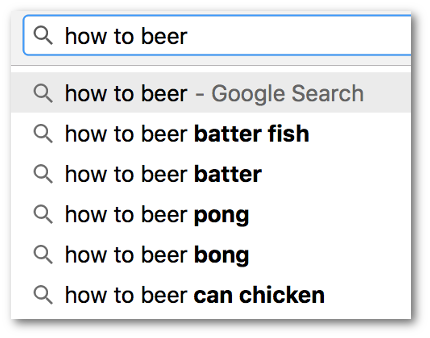
Basic three word search term. Google adds suggestions at the end of what you've typed.
Ready to put this into action?
Start your free journey today — no credit card required.
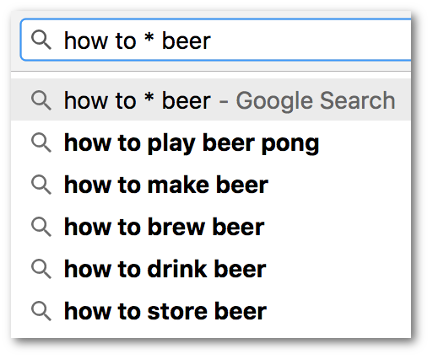
Insert an asterisk and now Google suggests keywords to fill in the space where the '*' is between 'to' and 'beer' as well after what you've typed.
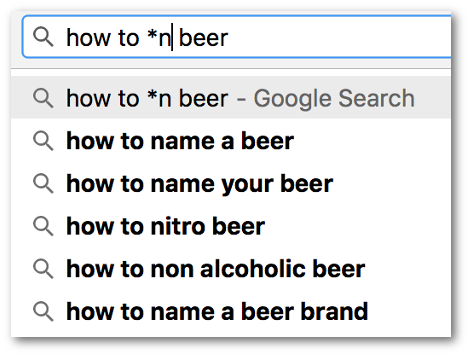
You can refine this by appending a character, e.g. an 'n', to the '*'. Now Google suggests anything that starts with an 'n' between 'to' and 'beer'. This can be a useful variation on the "Alphabet Soup" technique discussed in the training here.
I hope this little tidbit helps show some the cool things you can with Google Suggest (formerly known as Google Instant a few years ago)
Best!

Share this insight
This conversation is happening inside the community.
Join free to continue it.The Internet Changed. Now It Is Time to Build Differently.
If this article resonated, the next step is learning how to apply it. Inside Wealthy Affiliate, we break this down into practical steps you can use to build a real online business.
No credit card. Instant access.