Topical Maps for Niche Sites (Quickstart)


Published on February 12, 2026
Published on Wealthy Affiliate — a platform for building real online businesses with modern training and AI.

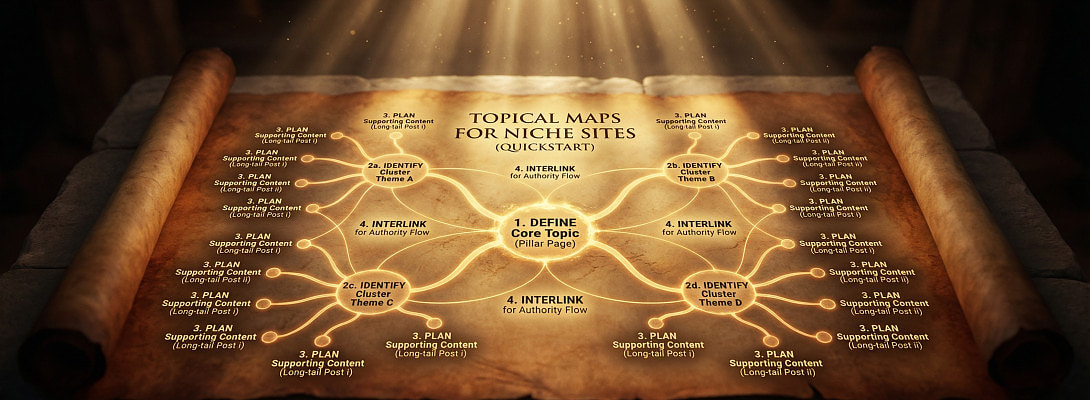
When I was young, my uncle drew a map of our village on the ground with a stick. He marked the houses, the river, the market, and the church. It wasn’t fancy, but it showed how everything connected. If you were new, you could find your way without getting lost.
That’s exactly what a topical map does for your niche site. It shows Google; and your readers; how all your content connects. Without it, your blog posts are like scattered huts with no paths between them. With it, you build a real village where people know where to go next.
What Is a Topical Map?
A topical map is simply an organized structure of topics and subtopics in your niche.
- Main Topic (the village) → Affiliate Marketing
- Subtopics (the neighborhoods) → SEO, Keyword Research, Content Writing, Link Building
- Posts (the houses) → “How to Find Low Competition Keywords,” “Best SEO Tools for Beginners,” “Internal Links That Rank”
When your site covers a topic from multiple angles, Google says, “This person knows this village well. Let’s trust them.”
Why It Matters
Google doesn’t just rank keywords anymore; it ranks authority.
Ready to put this into action?
Start your free journey today — no credit card required.
If you write only one post on “Affiliate Marketing,” you’re like a tourist passing through. But if you build 20 posts around it; covering tools, strategies, mistakes, comparisons; you’re a villager. Google trusts villagers more.
How to Build a Quick Topical Map (WA Style)
Step 1: Start With Buckets
Take your main niche and break it into 4–6 broad buckets. Example: fitness → workouts, nutrition, mindset, gear.
Step 2: List 5–10 Posts Per Bucket
For “nutrition,” you might write: “Best Protein Sources,” “Beginner Meal Plans,” “Supplements That Work.”
Step 3: Link Them Together
Internal linking is the road system of your village. Connect each house (post) to its neighborhood (bucket page) and to other houses nearby.
My Own Lesson
When I started, I wrote random posts with no plan. Google didn’t trust me, because my site looked like scattered huts.
But when I built my first topical map around blogging, everything changed. My posts reinforced each other. Rankings rose. Traffic grew. I finally had a “village” people could walk through without getting lost.
Why You Should Start Now
Topical maps don’t need fancy tools. A notebook and a little planning are enough.
- They save you from writer’s block.
- They build your authority faster.
- They make your site easier to navigate.
🔥 Pro Tip: Think like my uncle with a stick; draw your niche on paper before you build it online. If your map makes sense to you, it will make sense to your readers and to Google.
Because in the end, a niche site without a topical map is just a field of scattered huts. With one, it becomes a thriving village.
Share this insight
This conversation is happening inside the community.
Join free to continue it.The Internet Changed. Now It Is Time to Build Differently.
If this article resonated, the next step is learning how to apply it. Inside Wealthy Affiliate, we break this down into practical steps you can use to build a real online business.
No credit card. Instant access.