Saving Your Clipboard History


Published on September 13, 2016
Published on Wealthy Affiliate — a platform for building real online businesses with modern training and AI.
So I just discovered what I think will be a very useful tool in the future.
If you are like me you probably highlight and save text all of the time by copying it to your clipboard to easily transfer it back and forth from whatever webpages or programs you are using.
This can easily lead to wanting to copy more than one text at a time which then leads to the need for pasting a current copy to another location while you copy a different text and so on and so forth...
NO MORE!
Ready to put this into action?
Start your free journey today — no credit card required.
Due to recently copying WAY too much at once (stupid) and losing a good chunk of work I instantly searched for ways to enable clipboard history to prevent this from happening again.
I quickly found an extension for Chrome, because that is what I use, but I'm sure there are options for other browsers as well. You can find it here.
https://chrome.google.com/webstore/detail/clipboar...
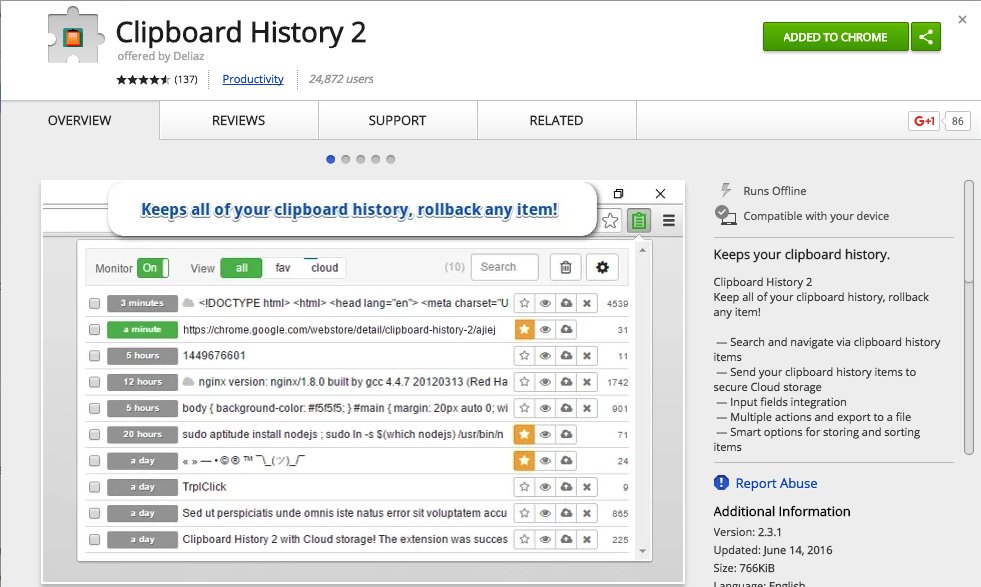
Basically it will add a little icon at the top right of your browser that keeps a complete history of all copied items!
No more frustration or lost work!
Hopefully this will add a little ease to someones day to day tasks. :)
Share this insight
This conversation is happening inside the community.
Join free to continue it.The Internet Changed. Now It Is Time to Build Differently.
If this article resonated, the next step is learning how to apply it. Inside Wealthy Affiliate, we break this down into practical steps you can use to build a real online business.
No credit card. Instant access.