How to Create Backlinks with Google Calendar (The Smart, Ethical SEO Play for 2026


Published on February 1, 2026
Published on Wealthy Affiliate — a platform for building real online businesses with modern training and AI.

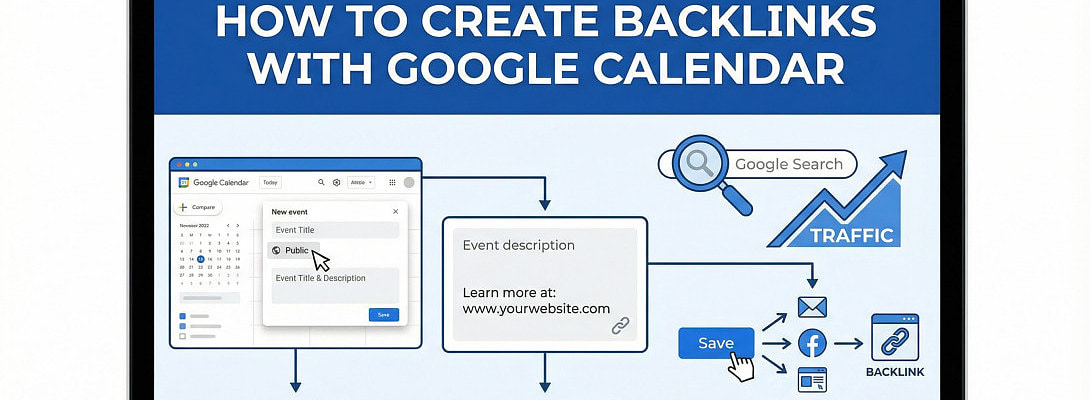
If someone told you Google Calendar could help your SEO, you might have smirked, rolled your eyes, or bookmarked it for later — right next to every other “clever hack” that never worked.
But stick with me.
Because what I’m about to walk you through isn’t a gimmick or a shortcut. It’s a real, sustainable way to earn contextual, indexable backlinks — and it works because it aligns with how modern SEO actually functions today: quality over quantity, relevance over randomness, and authority over spam.
Here’s the truth SEO pros won’t sugarcoat:
Backlinks are still one of Google’s core ranking signals — especially when they come from relevant, trustworthy sources and are embedded naturally within helpful content.
That means backlinks that are earned the right way — even from non-traditional platforms like Google Calendar — can still influence visibility, referral traffic, and indexing.
Let’s unpack how this works — and how you can actually do it well.
Why Backlinks Still Matter in 2026
In spite of all the talk about AI, generative search, and semantic ranking factors, backlinks remain central to search engine optimization.
Here’s what the data says:
- Pages with backlinks attract about 3.5× more organic traffic than pages without backlinks.
- 91% of top-10 Google search results have at least one backlink.
- The overwhelming majority of SEO pros (over 93%) say quality matters more than quantity when it comes to backlinks.
- Niche relevance matters: links from relevant websites are worth nearly 2.7× more for rankings than unrelated backlinks.
In short, backlinks are not “dead.” They’re not outdated. They’re still votes of confidence that tell Google your content is trusted, relevant, and valuable.
But here’s the nuance: Google doesn’t care how many links you have — it cares about the links that matter. That’s where strategy beats volume every single time.
The Google Calendar Angle: Why It’s Worth Your Attention
At first blush, Google Calendar doesn’t seem SEO-relevant — after all, how could a calendar tool help with rankings?
The answer lies in the way Google treats public calendars:
When you make a calendar public, Google assigns a unique URL to it — and that URL can be crawled and indexed like any other webpage.
Each event you create on that calendar also becomes a unique URL that Google can crawl and index.
And critically:
These event pages can contain contextual backlinks to your site.
That’s where the opportunity lies.
You’re not “gaming” Google. You’re giving Google indexed, useful pages with natural links that make sense in context.
That’s white-hat. That’s sustainable. It’s strategic.
Step 1: Set Up a Calendar That Matches Your Niche
The first thing you want to do is create a brand-new calendar that aligns with your niche — not your grocery list or dentist appointments.
Go to calendar.google.com and create a new calendar.
Choose a name that resonates with your audience.
For example:
- “Content Marketing Events & Resources”
- “SEO Growth Workshops & Webinars”
- “Product Launches and Insights Calendar”
Names like these immediately tell search engines (and humans, if they see it) what the calendar is about.
Next, add a rich description that includes one of your site’s URLs naturally — as part of a helpful sentence.
Example:
This calendar features upcoming workshops, webinars, and content releases that provide actionable insights for professional SEOs and content marketers. For full guides, case studies, and tools, visit the site...
That’s not spam — that’s contextual, helpful, and relevant.
Step 2: Make the Calendar Public (So It Gets Indexed)
Once your calendar is created, go into its settings and:
- Enable “Make available to public”
- Set visibility to “See all event details”
This step is critical. If your calendar isn’t public, Google can’t crawl or index it — and that kills the backlink opportunity before it even starts.
Once public, your calendar has its own URL — which becomes a real, indexed asset that can support links.
Step 3: Add Events That Deliver Real Value — With Natural Backlinks Inside
Ready to put this into action?
Start your free journey today — no credit card required.
This is where most people fail.
They add random, low-value events like:
“SEO Tools Promo Day — Buy Now”
That’s spam. Google ignores spam.
Instead, focus on useful events that genuinely serve your audience — with backlinks placed naturally within the event description.
For example:
🗓 Event: “Live Workshop — Backlink Strategies That Work in 2026”
Description:
Join our free live training as we break down modern backlink strategies proven to work in 2026 — including real examples and case studies. If you want the full guide before the session, read it here...
This does three things:
- It delivers useful information about the event
- It naturally includes a link to your content
- It creates an indexed page that Google can crawl and interpret
Unlike old-school link spam, this is contextual, relevant, and user-focused — exactly what Google rewards.
Fill your calendar with events like this — webinar announcements, blog post release events, video premieres, product launches, content upgrades, workshop dates — anything that can be tied to real value for your audience.
The key: every link should make sense inside that event description.
How This Fits Into Modern SEO Thinking
Backlinks aren’t just about search rankings anymore.
They signal trust, relevance, and authority, which are core parts of Google’s E-E-A-T framework (Experience, Expertise, Authoritativeness, Trustworthiness).
And that echoes what SEO professionals see across campaigns:
- Nearly 68% of SEOs believe backlinks strongly impact rankings.
- Over 85% of professionals say link building is crucial for brand authority.
- A majority plan to continue investing in backlink strategies because they drive real visibility and credibility.
In plain language: backlinks remain vital because they help search engines and users trust your content more than competitors’.
Building indexed pages with real links — like the ones inside your Google Calendar events — supports this ecosystem.
How to Amplify Your Calendar Backlinks (the Smart Way)
Creating a calendar and adding events is just the start. For maximum impact, treat your Google Calendar like a helpful resource hub tied to your content ecosystem.
Here’s how:
Promote Events Across Channels Strategically
When you add a new event, share it:
- In your newsletter
- On social media
- On your blog sidebar
- In webinar confirmations
Each of these pushes more people (and potentially search engines) to those indexed pages.
If your event content is genuinely useful, people will share it — and those shares often lead to natural backlinks, which are the gold standard in SEO.
Where Google Calendar Backlinks Fit in Your SEO Strategy
Let’s be real:
Google Calendar backlinks won’t replace high-authority editorial links from major publications, guest posts on authoritative blogs, or strong digital PR campaigns.
Those efforts are still the cornerstones of modern link building.
But here’s the beauty:
Calendar backlinks support your primary SEO strategy.
They create additional indexed artifacts tied to your brand. They support topical authority, diversify your link profile, and add natural relevance signals that make your overall SEO stronger.
Rather than chasing arbitrary link numbers, you are creating useful content pages — each with context, purpose, and a chance to be seen.
And that’s exactly what Google rewards in 2026.
Common Mistakes — And How to Avoid Them
If you’re going to do this right, steer clear of these pitfalls:
❌ Spammy event titles
Don’t try to stuff keywords like “SEO backlinks SALE $100 OFF”. That isn’t helpful to humans or search engines.
❌ Context-less links
A calendar with tons of links but no explanation about why they matter won’t be indexed meaningfully.
❌ Irrelevant events
Events that have nothing to do with your niche won’t help your SEO — Google sees right through that.
❌ Multiple calendars with duplicate content
Duplicate links on many calendars dilute value rather than strengthen it.
The golden rule is:
If it doesn’t help the user or make contextual sense, it doesn’t belong in your calendar.
How to Track Whether It’s Working
You can’t improve what you don’t measure.
Here are three ways to monitor the impact of your Google Calendar backlink strategy:
1. Google Search Console
Use URL Inspection to see if your calendar and event pages are being indexed. Look for impressions and clicks.
2. Google Analytics
Track referral visits coming from calendar.google.com URLs.
3. Backlink Tools (Ahrefs, Moz, SEMrush)
Monitor whether these calendar URLs are being picked up as referring pages and whether they drive secondary link activity.
If you see traffic, impressions, and indexing, you’re on the right track.
Final Take: Google Calendar Isn’t a Trick — It’s a Resource
If you approach this as a hack, shortcut, or gimmick — it won’t work.
But if you approach it as:
✔ A way to earn contextual indexed backlinks
✔ A vehicle for useful, structured content distribution
✔ A method to diversify how search engines view your brand
— then it becomes a legitimate, sustainable part of your SEO toolkit.
It won’t replace guest posting, digital PR, or high-authority editorial mentions.
But it will make your backlink ecosystem richer, more diverse, and more aligned with how search engines evaluate relevance in 2026 — and that’s a big deal.
Share this insight
This conversation is happening inside the community.
Join free to continue it.The Internet Changed. Now It Is Time to Build Differently.
If this article resonated, the next step is learning how to apply it. Inside Wealthy Affiliate, we break this down into practical steps you can use to build a real online business.
No credit card. Instant access.