Create A Name Plate At The End of Your Website - Add Color & Font


Published on October 20, 2018
Published on Wealthy Affiliate — a platform for building real online businesses with modern training and AI.


Hello Everyone!
I would have done a tutorial for this but I haven't been a member for 6 months yet so a blog post it is! This is actually really simple. I got the idea from a blog I saw with a name plate at the end of it. I thought it was so neat!!
You can design it however you want - to go with your website theme or to just make your name stand out. I'll even tell you about how you can internally link it.
Stand out from other websites by putting a personal touch. You design the logo, icon, pictures, so why not your OWN NAME!
Lets get started!! :)
Canva
Yes, this is one of my favorittteee websites of all time. I use it to create pinterest images, pictures, amazon photos, Google + photos, & more!
#1 Create a design

Click Postcard. (I actually clicked Nail Studio design.) (You can actually pick whichever one you want because when you save it, you can crop the image if your computer/phone lets you.)
#2 Pick background - You can leave it white if you prefer

You can see I clicked the template that is the first one in the second row.
I slanted the background.
Ready to put this into action?
Start your free journey today — no credit card required.
#3 Add font

#4 Download image - PNG & crop

Whenever I look at my image, in the top right hand corner it lets be crop & adjust. Your computer/phone might be different.
#5 Add an icon or other image
The website I saw had a paw print icon betwen her name & her dogs name - it was a dog site to help others with senior dogs.
#6 Save
#7 Log on to Website
#8 Go to one of your posts

Scroll down the very bottom of your post where you put your name.
#9 Add Media
#10 Upload your Name Plate
#11 Add title & alt text if you want
#12 Insert, Size Down, & Preview changes

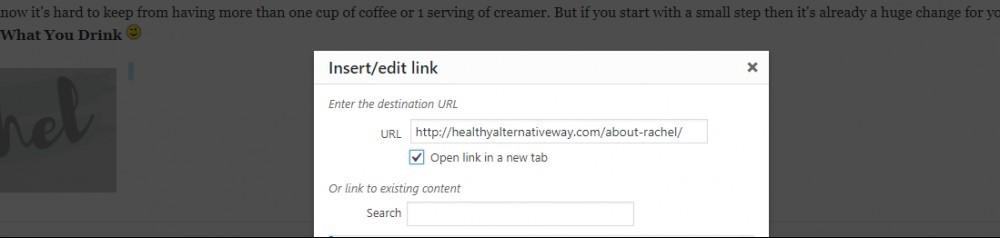
#13 (Optional) Insert Internal Link to About Post/Page
DONE! :)
You see, wasn't that easy & look how awesome it makes your post! Love the personal touch it gives off.
If you have any questions - leave them below. I'll be happy to help you out.
Share this insight
This conversation is happening inside the community.
Join free to continue it.The Internet Changed. Now It Is Time to Build Differently.
If this article resonated, the next step is learning how to apply it. Inside Wealthy Affiliate, we break this down into practical steps you can use to build a real online business.
No credit card. Instant access.