How do I place my post thumbnails in a panel


Published on March 14, 2016
Published on Wealthy Affiliate — a platform for building real online businesses with modern training and AI.
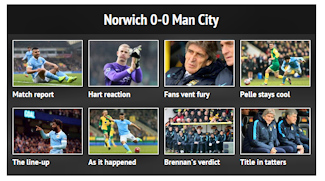
I would like to display a range of posts in a nice attractive thumbnail gallery format.
The thumbnails should be displayed in a panel with a title.
The panel should display two rows with four or five thumbnails in each row.
Ready to put this into action?
Start your free journey today — no credit card required.
I need to set the background colour of the panel, and a border around each thumbnail.
The post thumbnails need to be selected by category, and latest or random posts.
I have seen this done on many sites and it looks great but I have searched for a plugin without success.
I have added an image of what I am looking for below:
Share this insight
This conversation is happening inside the community.
Join free to continue it.The Internet Changed. Now It Is Time to Build Differently.
If this article resonated, the next step is learning how to apply it. Inside Wealthy Affiliate, we break this down into practical steps you can use to build a real online business.
No credit card. Instant access.