Page & Post Revisions In WordPress


Published on May 23, 2017
Published on Wealthy Affiliate — a platform for building real online businesses with modern training and AI.
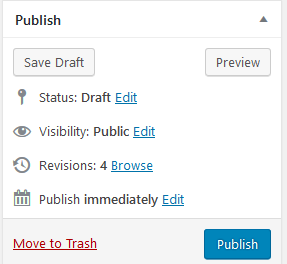
If you make a major blunder in your post or page, WordPress will remember your last 25 revisions. Simply look on the right margin of your editor and choose to browse the revisions, find the one you want, compare, and click to restore the one you want.
BillyGHawaii
P.S. Even though a post/page is Published.. you can revert it back to a pre-published state by simply editing it's status.
Edit the Visibility to make it Public, Private, or Password Protected
Share this insight
This conversation is happening inside the community.
Join free to continue it.The Internet Changed. Now It Is Time to Build Differently.
If this article resonated, the next step is learning how to apply it. Inside Wealthy Affiliate, we break this down into practical steps you can use to build a real online business.
No credit card. Instant access.