info on Instagram threads


Published on September 4, 2026
Published on Wealthy Affiliate — a platform for building real online businesses with modern training and AI.


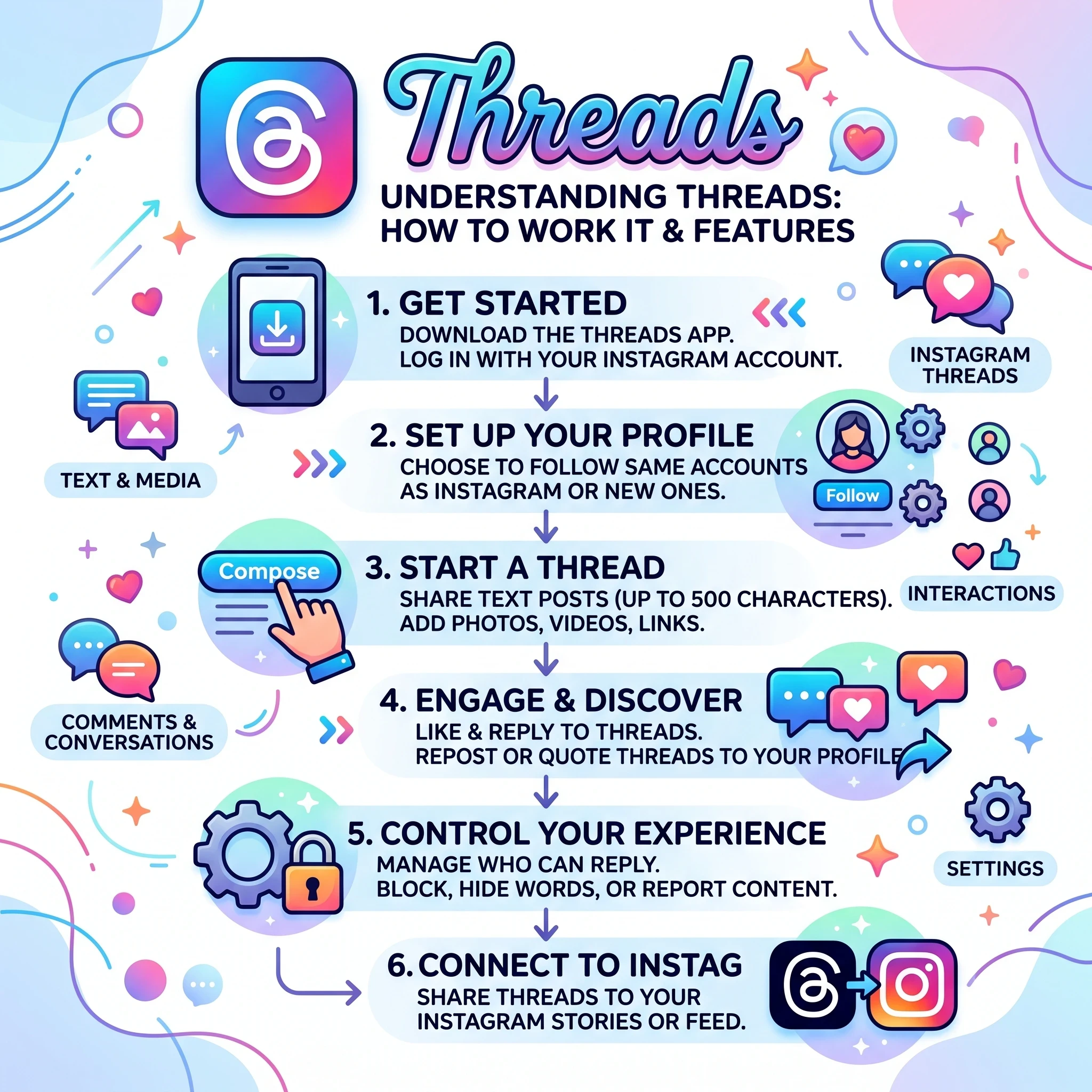
I just found this interesting about Instagram Threads. It is my first beginner look at the sub platform for Instagram Threads. I had not heard of it until I found a website with a new squiggle and wondered what that button does.
If you're familiar with the Threads, you may know all about this, but I had to dig around to get some more info for nubes like me.
Threads by Meta is a fresh spin on social networking, lined up as a compelling alternative to Twitter/X. This platform integrates directly with Instagram, allowing users to engage in textual micro-blogging without the high-stakes pressure often associated with other social spaces.
So, what's the core appeal of Threads? Picture it as a conversational playground meant for everyday musings, real-time interactions, and fleeting thoughts. It steps away from the heavily curated lives we sometimes portray on traditional social media platforms and celebrates simplicity and spontaneity.
The platform's inception roots back to the changing digital landscape, where users are clamoring for more organic interactions. The evolution from Twitter/X to Threads was driven by a need for an inventive space that promotes laid-back conversation, absent of algorithm-induced stress, yet still rich with diverse user interaction styles.
For those wondering why you should consider using Threads, it comes down to its ease and functionality within social media management. Messaging here feels just as accessible and straightforward as sending a quick note to a friend. Whether you're brewing up a conversation on a trending topic or just sharing a quick thought, Threads makes those moments easily shareable and even enjoyable.
Threads isn’t just another app on your phone; it’s an extension of your social presence, melding seamlessly with the way many of us already interact online. It addresses the demand for a less confrontational stage where discussions and updates can be as light or involved as you choose, providing a fresh breath in the social media realm.
Core Features of Threads: Building a Dynamic Experience
Threads shines in its ability to offer a straightforward, yet feature-rich environment tailored for diverse user interactions. One standout feature is the 500-character limit on text posts, which encourages users to be concise and thoughtful, yet creative and expressive in their communications. This balance lets you capture attention with clarity and impact.
But Threads isn’t just about text. Its support for various media forms like photos, videos up to five minutes long, GIFs, and links means you can enrich your posts with visuals. These multimedia options let you express yourself more fully and engage your audience in vibrant ways.
Incorporating topic tags and polls adds another layer to the interaction. Topic tags help categorize your posts and make them discoverable to others sharing similar interests, while polls allow you to actively engage your audience, inviting them into the conversation with quick feedback opportunities.
Ready to put this into action?
Start your free journey today — no credit card required.
Navigating through the two main feeds—For You and Following—enhances your browsing experience. The For You feed curates content based on your interests and recommendations, providing a mix of familiar and new voices tailored to your preferences. Meanwhile, the Following feed offers a streamlined view focused solely on the accounts you’ve chosen to follow, keeping things relevant to your direct interests.
These features work together to create a platform that feels both customized and expansive, giving you the tools to tailor your experience while exploring a wide range of content. Whether you’re finding new communities or fine-tuning your current network, Threads is equipped to support a personalized digital journey.
Streamlined Integration with Instagram: Simplifying Connectivity
Threads takes the hassle out of setting up another social profile by allowing you to sign in with your existing Instagram account. This streamlined integration means your Instagram username and handle carry over directly, giving you a consistent online identity without any extra effort.
Building your network is just as effortless. With a single tap, you can automatically follow the same accounts on Threads that you already connect with on Instagram. This instant network creation saves time and ensures you’re already conversing with familiar faces right from the start.
Cross-posting capabilities enhance your social media strategy. You can effortlessly share your Threads posts to your Instagram Stories or Feed. This feature maximizes the reach of your updates, ensuring they hit multiple channels and engage a broader audience.
These integrations simplify the management of your digital presence, merging your activities across platforms into one cohesive experience. It’s easy to keep your audience updated and active, no matter where they prefer to engage with your content. This functionality not only supports streamlined interaction but also amplifies your social impact.
Getting Started with Threads: A Step-by-Step Guide
Getting Threads up and running is a breeze. You start by downloading the app, available on iOS and Android devices or through a desktop browser via threads.net. This variety makes it accessible no matter your device preference.
Logging in is simple. Just choose the option to log in with Instagram. This step not only saves time but also seamlessly imports your profile details like your bio, link, and even your profile picture. It takes the headache out of starting from scratch.
Privacy settings are important, and Threads makes it easy to choose between having a public or private profile. This choice allows you to control who sees your posts and interacts with your content, tailoring the experience to your comfort level.
Creating your first post on Threads is straightforward. Tap the "+" button or notepad icon at the bottom of the screen. Write your thought, attach any media like photos or GIFs, and hit "Post." If you're in the mood to share more detailed thoughts or themes, you can add multiple posts in a thread by tapping "Add to Thread."
Starting with Threads is designed to be hassle-free and intuitive, ensuring you spend less time figuring out the platform and more time engaging with your audience. It's all about simplifying social media interactions and letting you share what's on your mind instantly.
Maximizing Engagement on Threads: Tips and Best Practices
Crafting engaging content is key to thriving on Threads. The concise 500-character limit encourages you to prioritize clarity and impact, making sure your message lands just right without unnecessary fluff.
Using multimedia in your posts can significantly boost engagement. Photos, videos, and GIFs not only make your updates more appealing visually but also create opportunities for more dynamic storytelling, holding your audience's attention longer.
It's crucial to navigate Threads with a sense of community in mind, promoting meaningful and respectful interactions. Engage with your followers by responding to comments, participating in discussions, and showing appreciation for different perspectives.
To understand what resonates best with your audience, keeping an eye on post analytics can be enlightening. Analyzing performance metrics helps you adjust your strategy to what works, giving your posts the visibility and interaction they deserve.
Ultimately, the success of your Threads experience hinges on your ability to blend creativity with strategic engagement. It's about making each post count and creating a space where conversations feel both rewarding and enriching. Plus for Wealthy Affiliates, it may be another great place to share or market tour Kre8or designs.
Pretty Please Let me know if you already knew about Threads in the comments....
Share this insight
This conversation is happening inside the community.
Join free to continue it.The Internet Changed. Now It Is Time to Build Differently.
If this article resonated, the next step is learning how to apply it. Inside Wealthy Affiliate, we break this down into practical steps you can use to build a real online business.
No credit card. Instant access.