Updated a post? Here’s how to have it re-indexed fast in Google


Published on September 2, 2019
Published on Wealthy Affiliate — a platform for building real online businesses with modern training and AI.


Creating content all the time is demanding. Leaving old content buried in the depth of your blog feed is a sure way to lose traffic to it.
One of the best ways to give new life to an old blog post which was bringing you traffic is to update it.
Maybe there is something new on the topic you can add. Perhaps you didn’t choose the right keywords at that time when your knowledge of SEO was hazy. Or probably nobody is searching for that content using the keywords you had used.
But don’t just republish your old blog post after updating it.
Ready to put this into action?
Start your free journey today — no credit card required.
Grab the URL, go into your Google Search Console:
- Click “URL inspection.”
- Paste the URL into the search bar and wait for Google’s test to complete.
- If Google doesn’t find any errors, click “Request Indexing.”
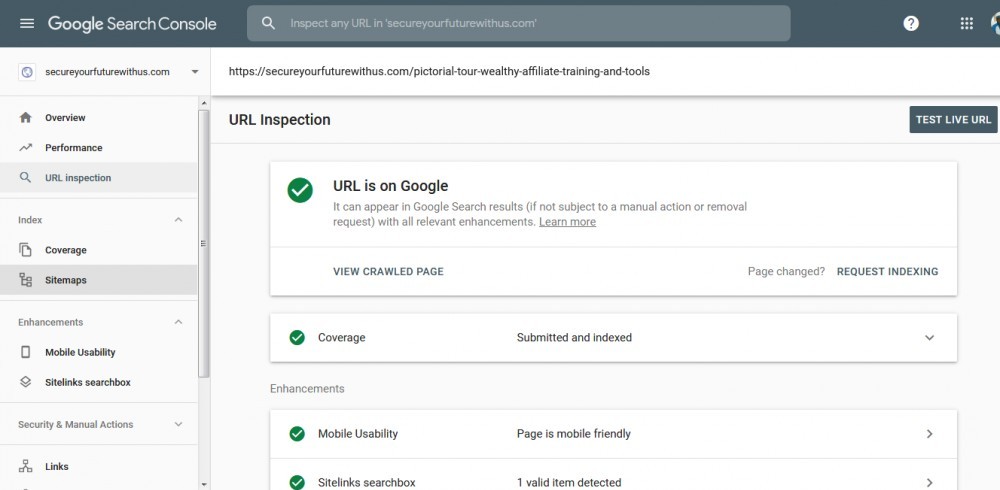
It may take anywhere from a few hours for a few days for Google to process your request, crawl the page, and add it to its index.
N.B.: This technique can also be used to have a new post indexed fast by Google.
After publishing your piece, grab the URL and go through the points above.
Share this insight
This conversation is happening inside the community.
Join free to continue it.The Internet Changed. Now It Is Time to Build Differently.
If this article resonated, the next step is learning how to apply it. Inside Wealthy Affiliate, we break this down into practical steps you can use to build a real online business.
No credit card. Instant access.